


Participant
March 9, 2023
Answered

Changes to Filmstrip order not reflected in HTML5 preview or SCORM Cloud

  • March 9, 2023
  • 2 replies
  • 350 views

Version 11.8.1.219


I have reordered some slides and everything shows the correct order in the filmstrip. When I preview to HTML5 or Scorm Cloud the new order is not reflected. All other edits to the slides are present. Is there a step I'm missing to make these changes?

This topic has been closed for replies.
Correct answer RodWard

Are you referring to the order of the topics in the TOC?


If you changed the slide order in Edit mode in Captivate but did not refresh the TOC then the order of topics shown there will not automatically update.


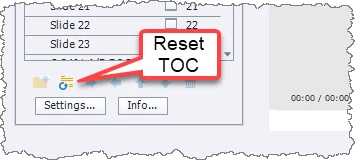
Go into the TOC settings and look for the small Refresh TOC button.

2 replies

Lilybiri
Legend
March 9, 2023

I have the same version installed on a system, which is still on Windows 10, but I cannot reproduce your problem. Rearranging the slides in the Filmstrip is reflected immediately when Previewing HTML in Browser (which is now the only Preview method, same as Preview, Project). 

Can you try the usual troubleshooting actions: clearing the cache and cleaning the Preferences? More details in this blog post:

https://blog.lilybiri.com/tips-for-troubleshooting

You didn't specify whether this is a responsive of a non-responsive project, nor whether you activated the TOC (as workaround for the no longer present Preview methods)? The TOC will not automatically be reset when you rearrange slides in the Filmstrip but the rearrangement will immediately be respected in Preview for me.

I don't expect the browser choice to be responsible, but can you tell which is your default browser?


RodWard
Community Expert
RodWardCommunity ExpertCorrect answer
Community Expert
March 9, 2023

Are you referring to the order of the topics in the TOC?


If you changed the slide order in Edit mode in Captivate but did not refresh the TOC then the order of topics shown there will not automatically update.


Go into the TOC settings and look for the small Refresh TOC button.

Participant
March 9, 2023

Thank you Rod! That was the issue.


Much appreciated,

Dustin