

Changing text direction on shapes--possible or impossible in Captivate?
Hello,
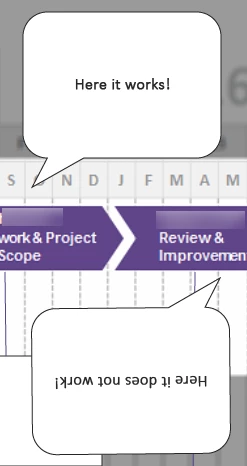
I was working on a timeline in Captivate and wanted to call out sections of the timeline phases by using the shapes and text. Due to space and the background graphic, I was experimenting with having the comment shapes on the top and also on the bottom of the timeline The shapes were fine yet when I placed the comment shape upside down by using the turning point, the text goes upside down. The text direction is wrong.
Either: a) I cannot do this because it does not exist or b) I have not discovered how to fix this or c) I need to do this in another tool and import it as a .png which does not help with creating timed releases of each shape/text object.
I have attached an example. I am within the first year of Captivate so I am on the learning curve yet this helps my learning. Any insights are very welcomed. Thank you.
 AdChoices