Participating Frequently
August 30, 2012
Question

Changing TOC Fonts in Captivate 5.5

  • August 30, 2012
  • 1 reply
  • 1073 views

Heya all,

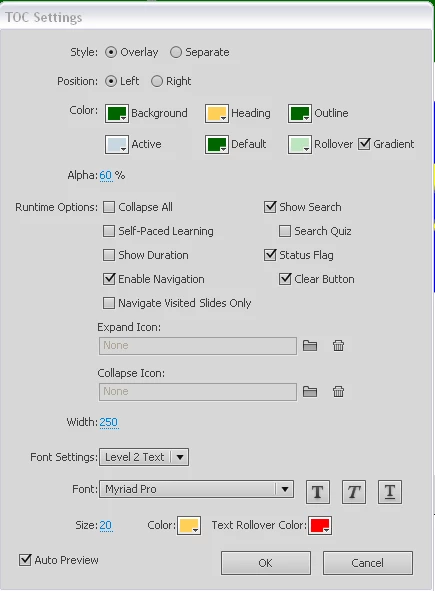
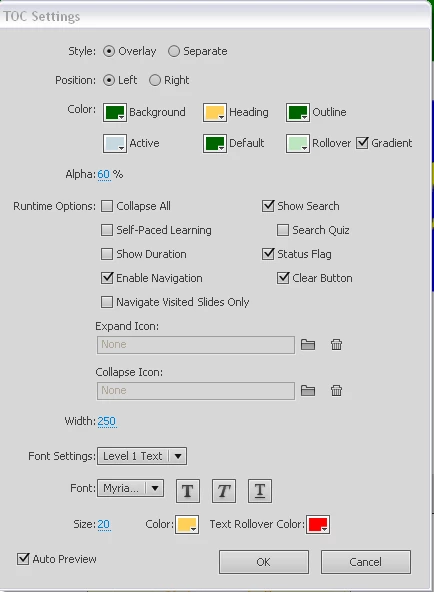
It seems like today is the day I get to bother everyone.  I'm attempting to change the font and color displaying in my TOC for a project.  I am able to alter the Level 1 Text to the desired font and color but the additional levels (2-5) do not update when the attributes are changed.  I have included screenshots of the project below.

Cheers,

Anthony
This topic has been closed for replies.

1 reply

Lilybiri
Legend
August 30, 2012

Maybe I miss something, but I do not see a Level 2 in your TOC? 'Home' is level 1, in normal status, and 'Roles...' has taken on the Text Rollover color. Could you show a screenshot where there is a Level 2 text? You get it when you have group of slides: the group will be at Level 1 and the slides at level 2. Grouping can be done in the Filmstrip (best practice) or in the TOC. The TOC moreover allows you to have more than 2 levels, so you can make subgroups in groups of slides to have level 3.

Lilybiri

Participating Frequently
August 30, 2012

I'm sorry about that.  I used the wrong terminology.  I'm just wanting to change the color and font for the headers and footers of the TOC.  Is this possible?  I don't have any grouping enabled on the TOC as this is a very short presentation and isn't necessary.

Thanks,

Anthony