
Inspiring
January 18, 2018
Answered

Check file permissions?

  • January 18, 2018
  • 1 reply
  • 765 views

I have a few questions about Captivate 8 and it's daily problems importing PPT.

  • Once again, it won't import a ppt file. I waited and got this message below.  how do I check the file permissions?

  • Second, might the problem be I don't set the Publish At to the file I am importing the PPT from? Notice I'm not talking about Project Cache. That's set.
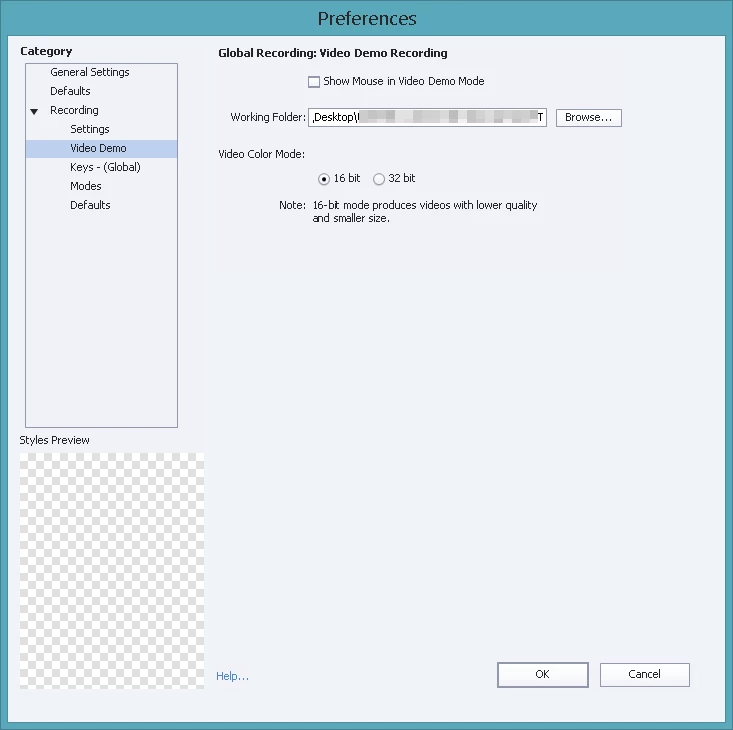
  • I went to the Preferences and see that the Global Recording: Video Demo Recording Working  Folder was set to a place on the desktop that I was working on last year. Might this have something to do with it?
  • If I only select 10 PPT slides out of 40 slides, then make a Captivate file out of them, can I import the remaining 30 slides later?

Thanks for your help.

This topic has been closed for replies.
Correct answer AnotherMe

I found the solution to adding more slides. Simply click either the update ppt icon in the library menu bar, or click import again. Captivate 8 will allow me to select the number of PPT slides I want in Captivate.

1 reply

AnotherMeAuthor
Inspiring
January 18, 2018

Captivate 8 suddenly started importing the PPT file again.

I read in another post to open PPT and see if that works. I did that. And Captivate suddenly started Importing PPT. Even after I closed PPT it imported PPT.   I don't know if the two any anything to do with each other.

AnotherMeAuthorCorrect answer
Inspiring
January 18, 2018

I found the solution to adding more slides. Simply click either the update ppt icon in the library menu bar, or click import again. Captivate 8 will allow me to select the number of PPT slides I want in Captivate.