
Check if user has selected checkbox - if not, show popup message
Hello,
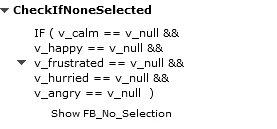
I'm using the checkbox interaction. The user has four checkbox selections. After they make a selection, they click a Submit button which checks the answer. For this, I have a conditional action. For the first decision called Check if Empty, it evaluates if all 4 answers = v_null (so it evaluates if no checkboxes have been selected). If so, then a popup appears telling the user to select a checkbox before clicking Submit.
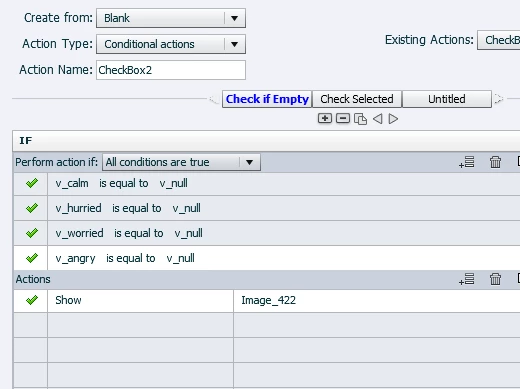
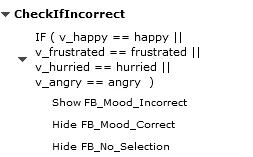
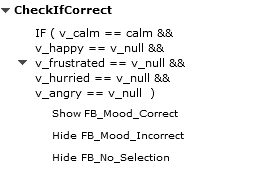
For the second decision called Check Selected, it evaluates if the correct checkbox has been selected (in this case, v_hurried). If it has been selected, and the user clicks the Submit button, it will perform the required actions.
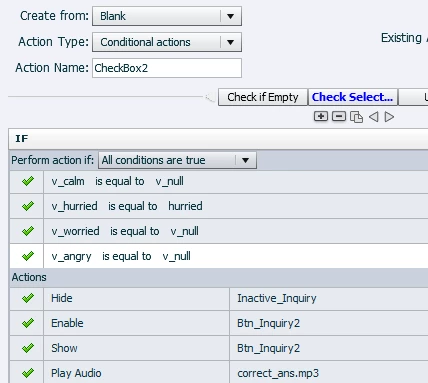
The issue is that when I click Submit without having selected a checkbox (so it first evaluates Check if Empty), it shows the popup window like it should, but then it continues to the next decision and evaluates it and performs those actions.
I need it to pause after the Check if Empty decision is evaluated (so it stops with the popup and waits for the user to select a checkbox and click Submit). Then, when the user selects a checkbox, it will then evaluate the Check Selection decision and complete the required actions.
Thanks for your help,
David
Working in Captivate 9 on a PC.
 AdChoices