
Known Participant
October 6, 2015
Answered

Checkbox Widget & Advanced Actions Help

  • October 6, 2015
  • 2 replies
  • 2044 views

Hi all,

I've created a slide that contains 2 questions ( 1 using the CheckBox Widget and 2 using the Radio Button Widget) as shown below.
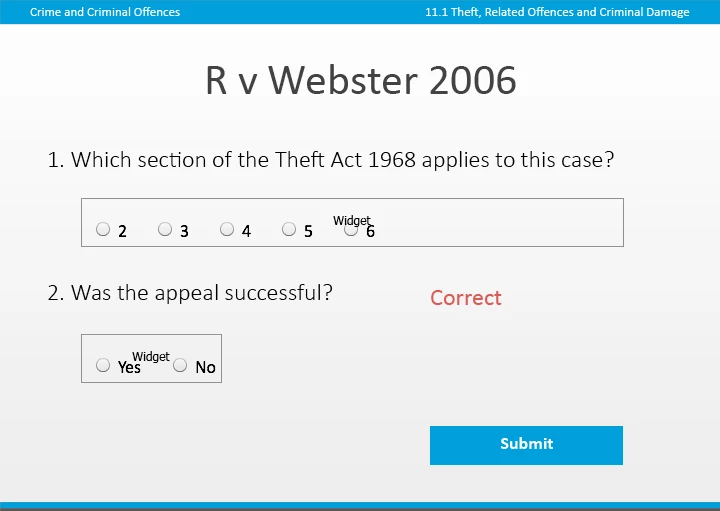
I've set up an Advanced Action (below) that checks that the user has selected the correct answers and then displays feedback (either correct or incorrect) and then advances to the next slide. The correct answers are 2 and 5 for the Checkbox Widget and No for the Radio Btn Widget.
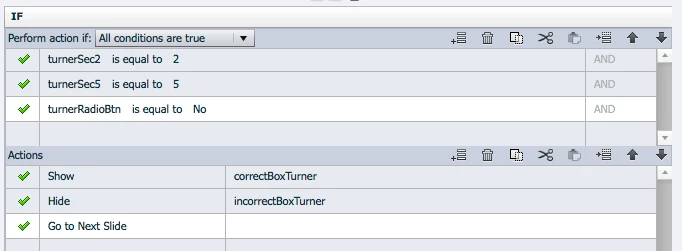

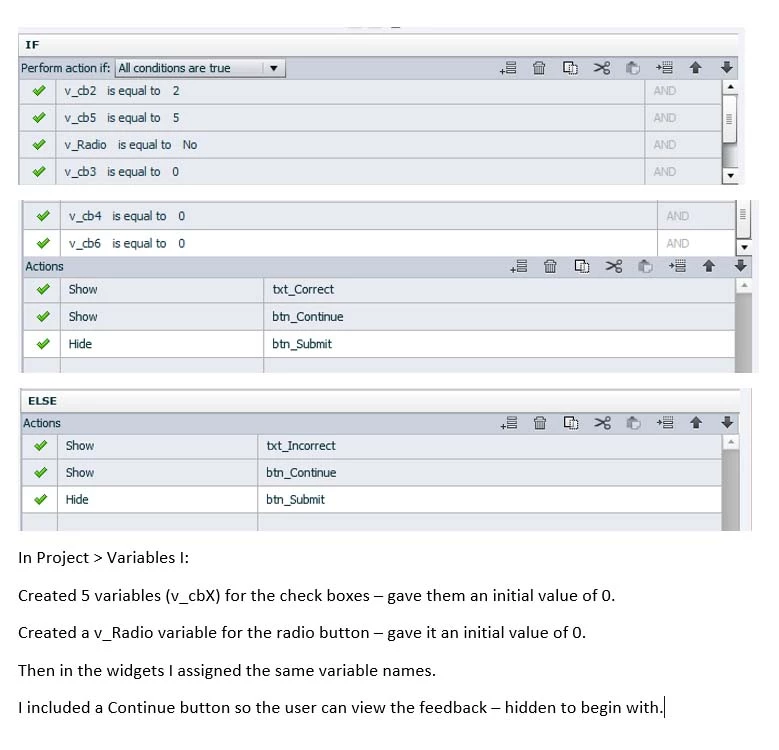
The problem I'm having is to do with question 1 that uses the checkbox widget. Although the user only needs to select 2 and 5, they can select more checkboxes and the slide will still advance. Is there anyway that I can reconfigure my advanced action, so that this doesn't happen?


Thanks,


Ross
    This topic has been closed for replies.
    Correct answer donalall

    Hi, I copied all of the files to a new project and received the same error. So the error must be on one of the slides, I guess. One thing that could potentially be causing a problem is that I created a v_NULL variable earlier in the project that I'm no longer using. However, when I check the variable usage it says it is being used and won't let me delete it. I've checked the conditional action that Captivate thinks the variable is being used by, but it's not being used. I'm puzzled.


    Hi Ross

    Try this - it's the advanced action attached to Submit button.

    Donal.

    2 replies

    Participating Frequently
    October 7, 2015

    Hi Ross,

    In response to the first issue you had, all actions in the advanced actions will start executing simultaneously. So before you see the show, hide actions, its moving to next slide.

    If you are using captivate 9, you can use delay in this scenario.

    Here is how you can use,

    provided that you hide the correct and incorrect captions directly from PI

    Thanks,

    Rahinie

    Known Participant
    October 7, 2015

    Thanks Rahinie, that's very helpful. Unfortunately however, I'm using Captivate 8, not 9.

    When I split the conditional action into 3 separate decision blocks (explained in my second post above), I thought that this would resolve the issue of all of the actions executing simultaneously as the first decision block is only checking for the correct answers, the second checking for any incorrect answers and the third just displays the appropriate feedback.

    Any idea why this method would not work?

    Ross

    Participating Frequently
    October 7, 2015

    If possible could you send the project which is showing the issue so that we can investigate on our end.

    You can upload it to a shared location (eg Dropbox) and share the link at murugath@adobe.com

    Thanks,

    Rahinie

    Captiv8r
    Legend
    October 6, 2015

    In thinking about this, wouldn't you need to insert additional statements in the first part? Because all you are checking is to see if 2 and 5 are selected. I might think you would also want to add something like if 3, 4 and 6 are NOT selected. Then if any of those are selected, the if part would be moot and the else part would be triggered.

    Cheers... Rick

    Lilybiri
    Legend
    October 7, 2015

    I am puzzled because I see twice the radiobuttons widget, there is no checkbox widget on your screenshot?

    The radiobuttons interaction has only one associated variable, indeed, you label it TurnerRadioBtn and it will have the exact name of the chosen item, in this case 'No'.

    If you use a real checkbox interaction, you'll have 5 associated variables, but you should see checkboxes, not radio buttons. Have a look at the movie in:

    Tips - Learning Interactions - Captivate blog

    You will see how I track the associated variables both for the radiobuttons and the checkboxes interactions by inserting them in a text container.

    Rick, the conditional action is indeed incomplete, because none of the other variables with incorrect values may be selected, only the correct ones. Depending on the default value of those variables, either 0 or empty, the conditions to be added are:

    IF..... v_one is equal to 0

             v_three is equal to 0

             v_four is equal to 0

    If the variables are not initilialized to 0 but are empty, an empty variable has to be created v_null, and it will be

          is equal to v_null

    Known Participant
    October 7, 2015

    Hi,

    Really sorry for the confusion, I uploaded the wrong screenshot from a previous slide. This is the one I should have uploaded with the checkbox widget.

    Lilybiri - I tried amending the conditional action to check if turnerSec3, 4 and 6 are equal to 0 as suggested but I got the following error message when I published the file. I also created the variable v_NULL and tried using that but also got the same error.

    Then, as an alternative I tried breaking the action up into 3 decision blocks as follows:

    Condition 1 - Checks if the user has selected the correct answers and if so assigns vTurnerOK with 1 (correct).

    Condition 2 - Checks if the user has selected any incorrect answers and if so assigns vTurnerOK with 0 (incorrect).

    Condition 3 - Finally checks if vTurnerOK is equal to 1 or 0 then displays the appropriate feedback.

    Upon trying to preview this interaction, I still got the same error pop-up window as mentioned before.

    Can anyone see what I'm doing wrong?

    Thanks,

    Ross