Here's a solution that requires one simple line of js, but is otherwise completely built from Advanced Actions:
Create a user variable v_countClicks and give it a default value of 0
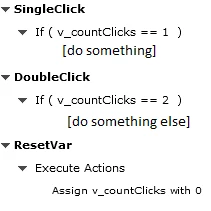
Create an invisible interactive object somewhere on the slide (I always use SmartShapes used as buttons), name it Action_Shape, hide it from the output and assign it the following Advaced Action (I called mine a_Action):
On the actual click box that should trigger the SingleClick or DoubleClick actions respectively, put the following Advanced Action (I called mine a_Trigger):
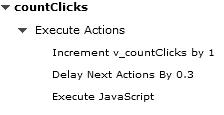
The JavaScript just being this one line, ran on the current window:
cp.clickHandler(Action_Shape);
Delay Next Action By controls the 'sensivity' of doubleclick detection. One can play with it to set it as low as possible and as high as necessary, as of course the actions will be executed with this delay.




 AdChoices