


caitlinm38096965
Known Participant
July 15, 2015
Answered

Click on hidden objects

  • July 15, 2015
  • 1 reply
  • 1719 views

I'm using Captivate 8 and I have a number of hidden objects on a slide that are grouped (they are shown through an advanced action). Even though they are hidden I can still click on them and a blue selection bar appears around the edges. Has anyone else had this problem before?

This topic has been closed for replies.
Correct answer Lilybiri

I am on PC - I will try to use advance actions to hide the buttons first, but will that remove the blue bounding box as well?


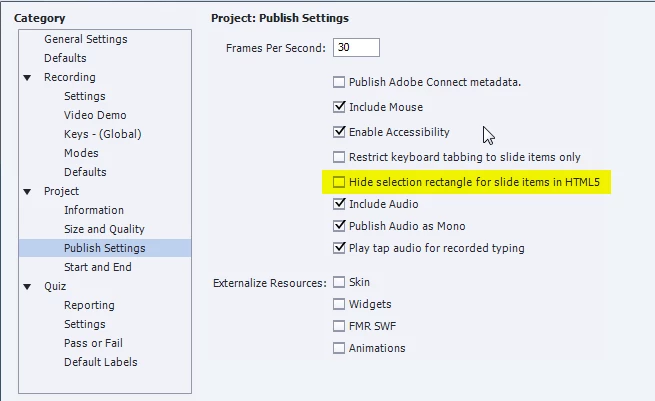
Sorry, I see that Rick didn't answer. This is the setting you have to change:

1 reply

Lilybiri
Legend
July 15, 2015

Are you talking about shape buttons and HTML5 output?

caitlinm38096965
Known Participant
July 15, 2015

The objects are smart shapes and shape buttons, and yes it is HTML5 output.

Captiv8r
Legend
July 15, 2015

Can you share screen shots of the timeline as well as the properties panel for these objects?