

Clickbox Error Caption in Edge Browser
Hello,
I'm building software trainings with captivate 9 and the HTML5-output behaves in Microsoft Edge somewhat different from other browsers.
On slides with an learner interaction, the timeline looks like this:
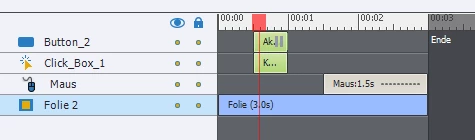
The learner should click on the clickbox, which is placed somewhere on the screen. If he clicks it, the project jumps to the next slide and continues. If he clicks somewhere else, he gets an failure caption.
The Button on the slide is an "demo"-button. After clicking it the project continues and the mouse demonstrates where to click.
This setup worked fine in several Capitvate-Versions (4-9) and in different Browsers (IE, Chrome, Firefox, iPad-Safari...). Used on this browsers, I don't get the failure message of the clickbox, if I click on the demo-button. That's fine.
Opened on the Edge Browser/Windows 10, a click on the demo-button shows the error message of the message of the clickbox. This is somewhat disturbing for the learner.
Has anyone a hint, why this behaviour differs between the browsers?
Best regards
Holger.
 AdChoices