


Inspiring
May 30, 2021
Answered

Clickbox state not working when cursor over box

  • May 30, 2021
  • 2 replies
  • 851 views

Hi,

here is a fun one!

I did create  3sec+/3sec- buttons (thanks Rick Wilson) and wanted it to look like this.
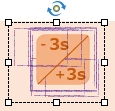
As we can see I used 2 triangles atop each other (well oblique of course) and shapes with image fill to get the look.

Actually the forward and rewind work great only if they are not on top each other.
Also there is no "cursor over" image state change. Sometimes it is triggered but only if I come from a specific direction and hit a certain spot.
This is very strange to me.

Even if I place the 2 triangles apart the hover state doesn´t work.
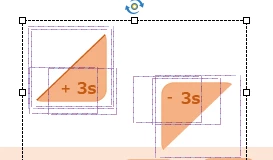
My assumption, these triangles are still somehow just a rectangular box...

Any idea how to fix it or at least create an alternative?

Thanks!

    This topic has been closed for replies.
    Correct answer Lilybiri

    I don'y know what you mean by 'squiggle' states at all. But want to offer you some ideas.

    The 'click box' is IMO a very outdated interactive object, hope that it will soon be deprecated. You cannot use it in any fluid box, because it always means that you need to stack the click box over another object. Since Captivate  6 shapes used as buttons made the use for your use case superfluous.

    Moreover a Click box is by definition invisible for the learner, which also means that it has not states whatsoever. You can have a hand cursor appear, but that is all.


    The bounding box which you show is the real problem. For any type of button, with the exception of the SVG, the clickable area will be the bounding box, not the shape.


    The best approach has been made possible, but only in version 11.5 by using a SVG as button. That is the only type of button which allows to restrict the clickable area to the image itself. Still, you need to be careful  if you put them too close, the feature may not be functioning correctly.

    Alternative could be to use a custom state in a shape button. If you switch to that custom state, the Normal state will be replaced by the custom state. If you have Rollover and Down states, they will remain the same.


    Here are some links, where you'll find more details:

    http://blog.lilybiri.com/overvew-6-button-types

    http://blog.lilybiri.com/power-of-svg-buttons

    http://blog.lilybiri.com/1-action-equals-5-toggle-buttons


    2 replies

    Lilybiri
    LilybiriCorrect answer
    Legend
    May 31, 2021

    I don'y know what you mean by 'squiggle' states at all. But want to offer you some ideas.

    The 'click box' is IMO a very outdated interactive object, hope that it will soon be deprecated. You cannot use it in any fluid box, because it always means that you need to stack the click box over another object. Since Captivate  6 shapes used as buttons made the use for your use case superfluous.

    Moreover a Click box is by definition invisible for the learner, which also means that it has not states whatsoever. You can have a hand cursor appear, but that is all.


    The bounding box which you show is the real problem. For any type of button, with the exception of the SVG, the clickable area will be the bounding box, not the shape.


    The best approach has been made possible, but only in version 11.5 by using a SVG as button. That is the only type of button which allows to restrict the clickable area to the image itself. Still, you need to be careful  if you put them too close, the feature may not be functioning correctly.

    Alternative could be to use a custom state in a shape button. If you switch to that custom state, the Normal state will be replaced by the custom state. If you have Rollover and Down states, they will remain the same.


    Here are some links, where you'll find more details:

    http://blog.lilybiri.com/overvew-6-button-types

    http://blog.lilybiri.com/power-of-svg-buttons

    http://blog.lilybiri.com/1-action-equals-5-toggle-buttons


    Inspiring
    May 31, 2021

    Thanks a lot as always.

    I do think they really need to do some heavy reprogramming from scratch.

    I don´t dislike the program but it seems very outdated partially. I have been working with it since 2015 and not that much has changed.


    RodWard
    Community Expert
    Community Expert
    May 31, 2021

    Be careful what you wish for.  When Captivate 5 came out it was a total revamp of the previous design but it was plagued by many major and minor bugs.  While I would also like to see Captivate updated, I'm not looking forward to the "teething issues".

    Inspiring
    May 30, 2021

    Have I found my own answer?
    Custom shapes? Using the squiggle shape option. Well, let me try...