


Inspiring
May 22, 2023
Answered

Closed Captioning - Not All Rows Display After Publish - HTML5 CP 2019 Release 11.8.1.219

  • May 22, 2023
  • 1 reply
  • 421 views

I have 8 rows of notes that have been selected for Closed Captioning. When previewed in the Closed Captioning editor, everything seems great. But, unfortunately, when I Preview HTML5 in Browser, OR when I publish to HTML5 and play, not all of the rows appear. For example, rows 1 and 2 display correctly, then it "hangs" on row 2, doesn't display row 3 at all, and then row 4 will appear at the correct moment.


All other slides with CC are working great, and most of them have either 1 or 2 rows.


Any ideas on what's causing this?
This topic has been closed for replies.
Correct answer Tichelle_Berg

Indeed a complete misunderstanding. You are talking about the slide notes, not the rows in the CC. Sorry about that. 

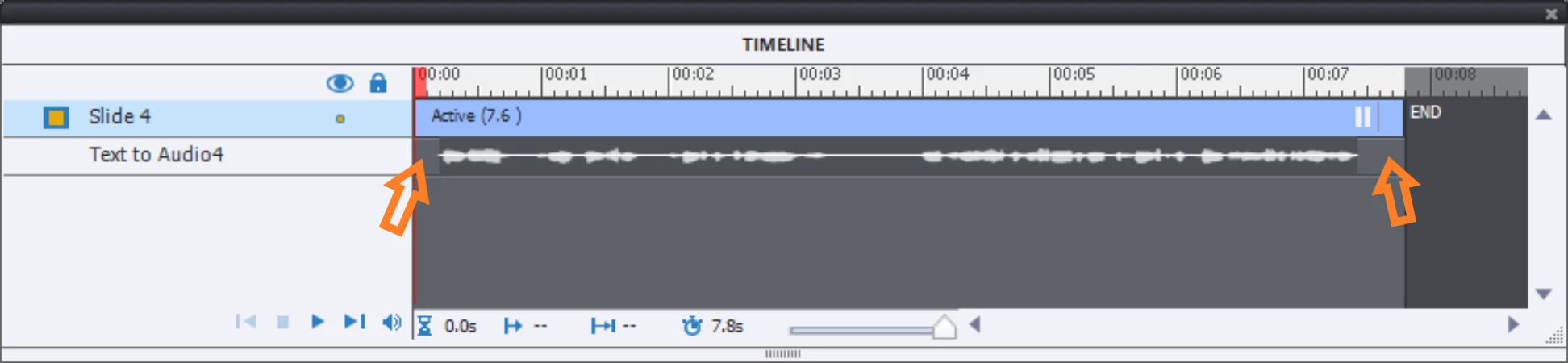
Did you provide a gap before and after the audio timelines in the slides? Like in this screenshot:

There are two reason for these gaps:

  • Since audio files need to be loaded On Enter for each slide, it provides a little bit more time (barely felt by the learners because it is very short)
  • It avoids to have Captivate see all the audio files as one big project audio clip which needs to be loaded on the first slide with audio. I have a feeling that this can lead also to the synch problems you seem to have here.

Thanks, Lilybiri, I've never seen that as a best practice before, and it makes sense. 

Instead, my coworker removed all the text from the slide notes and added it again. The difference is that this time, after he added the first piece of text, when he clicked to add a new row of text to the slide notes, he made sure Captivate added the new row below the first one so that in the end, he didn't have to re-order the rows of text. Now, it is working exactly as it should.

Thank you for taking the time to try to resolve the issue, it's appreciated.

1 reply

Lilybiri
Legend
May 22, 2023

Why do you need so many rows, that seems not very user friendly. CC is meant to be synchronized with the audio, split up those long captions in multiple sentences and the experience will be much better since it will follow the narration closely. Do you ever see subtitles in a movie which have 4 or more rows?

Sorry if you have a real reason for so many rows, but I don't understand it. Do you use a very small width for the captions?

Inspiring
May 22, 2023

See attached screenshot. We are talking about 2 different things when we're talking about rows. I understand CC and have used it for years, so I'm good there. It's displaying them out of order, and sometimes is skipping them entirely.

Lilybiri
Legend
May 23, 2023

Indeed a complete misunderstanding. You are talking about the slide notes, not the rows in the CC. Sorry about that. 

Did you provide a gap before and after the audio timelines in the slides? Like in this screenshot:

There are two reason for these gaps:

  • Since audio files need to be loaded On Enter for each slide, it provides a little bit more time (barely felt by the learners because it is very short)
  • It avoids to have Captivate see all the audio files as one big project audio clip which needs to be loaded on the first slide with audio. I have a feeling that this can lead also to the synch problems you seem to have here.