
Closed Captions
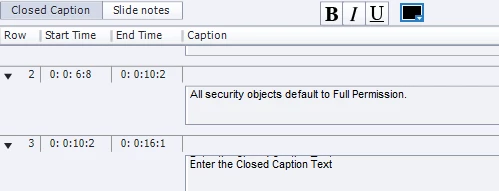
The new 2017 version of Captivate seems to have a few bugs related to closed captioning, which I use for every project. I generate text-to-speech narration, and before I add any vtml tags I copy the text to the captions tool. Once I've got the phrasing and pauses added, in the caption tool I break the text captions into smaller 'chunks.' I set the captions to display at exactly the right point, everything looks good, there are no 'empty' lines - I save, and Captivate does not save it properly. It randomly injects blank lines that say "Enter the Closed Caption Text" and loses the text that was supposed to appear in that spot. It's VERY annoying and time-consuming, and quite consistent. How do I go about reporting this to whomever needs to know, to get it corrected? Thanks. Here's a screenshot.
 AdChoices