leonorab13410749
Participant
March 28, 2019
Answered

Color Pallete Creator

  • March 28, 2019
  • 1 reply
  • 772 views

In the Captivate Specialist course, Dr. Pooja told us about a website that she uses to create a color palette that she exports and keeps in each course she creates, so the colors are handy.   Does anyone have the website?

Thanks

Correct answer Lilybiri

She was talking about Adobe Color CC, formerly known as Adobe Kuler, but now part of Adobe Capture CC.

Have a look at: Colour palette generator, colour scheme generator | Adobe Color CC

Bit confusing. Moreover the palette generated here has only 5 colors, whereas the Captivate Theme Colors >Palette has 10 colors + 50 tints based on those primary colors.

I wrote wuite a lot of blogs about them. The Theme colors palette is available in the Color dialog box, first button.
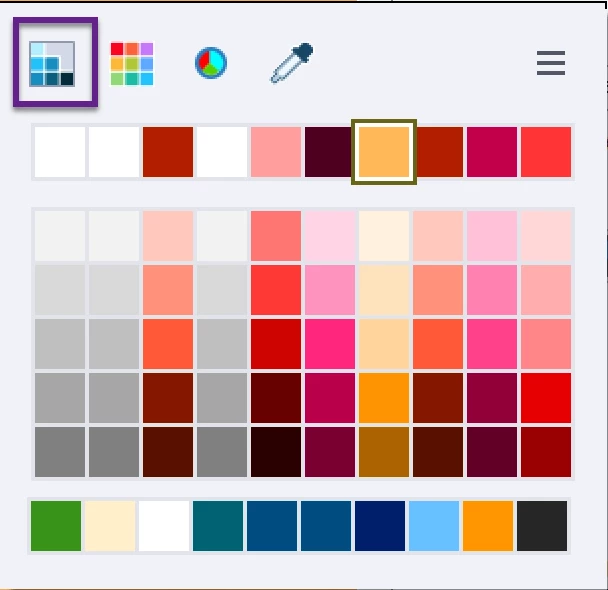
Use them from this dkialog box, not by putting the colros in the scratch area, because the color picker never guanantees to pick the exact same color. Sorry for that cirtical note. I statrt every project by creating a color palette.

1 reply

Lilybiri
LilybiriCorrect answer
Legend
March 28, 2019

She was talking about Adobe Color CC, formerly known as Adobe Kuler, but now part of Adobe Capture CC.

Have a look at: Colour palette generator, colour scheme generator | Adobe Color CC

Bit confusing. Moreover the palette generated here has only 5 colors, whereas the Captivate Theme Colors >Palette has 10 colors + 50 tints based on those primary colors.

I wrote wuite a lot of blogs about them. The Theme colors palette is available in the Color dialog box, first button.

Use them from this dkialog box, not by putting the colros in the scratch area, because the color picker never guanantees to pick the exact same color. Sorry for that cirtical note. I statrt every project by creating a color palette.

leonorab13410749
Participant
March 28, 2019

That is so helpful..Thank you Lilybiri!!

Lilybiri
Legend
March 28, 2019

You're welcome.