
Participant
January 15, 2016
Question

communicating scorm data to google docs?

  • January 15, 2016
  • 2 replies
  • 1362 views

Hello

I am currently using Captivate 9 and I am wanting to get the SCORM Data in my published project to communicate to a google form so I can easily collect data.  A friend of mine, who uses Articulate, has sent me the Java Script over that he uses and I have tried to recreate it in captivate.

Here is the script I am using:

var player = GetPlayer();   

    $.ajax({

url: "https://docs.google.com/forms/d/1MoKIpyIMjfJdb9zKs3BdY2HRvjjzdcKcJky_KtfaZl8/formResponse",

           type: "POST",

           data: {"entry.1690054005" :player.GetVar("cpQuizInfoStudentName"), "entry.611090497":player.GetVar("cpQuizInfoStudentID"), "entry.1316822733" :player.GetVar("cpInfoCurrentDateStringDDMMYYYY"), "entry.1402162927" :player.GetVar("cpInfoElapsedTimeMS"), "entry.618856082" :player.GetVar("cpInfoLastVisitedSlide"), "entry.193520631" :player.GetVar("cpInfoPercentage"),"entry.991115191" :player.GetVar("cpQuizInfoAttempts"), "entry.250243260" :player.GetVar("cpQuizInfoPassFail"), "entry.1161631701" :player.GetVar("cpQuizInfoTotalCorrectAnswers"), "entry.1109168399" :player.GetVar("cpQuizInfoTotalQuestionsPerProject"), "entry.1991159250" :player.GetVar("cpQuizInfoTotalUnansweredQuestions")},

           success: function(data)
{

               //alert(data);

           }

         });

    return false;

and I have this executed on entry of my quiz results slide, so in theory the google form should update each time somebody completes the quiz, see below:
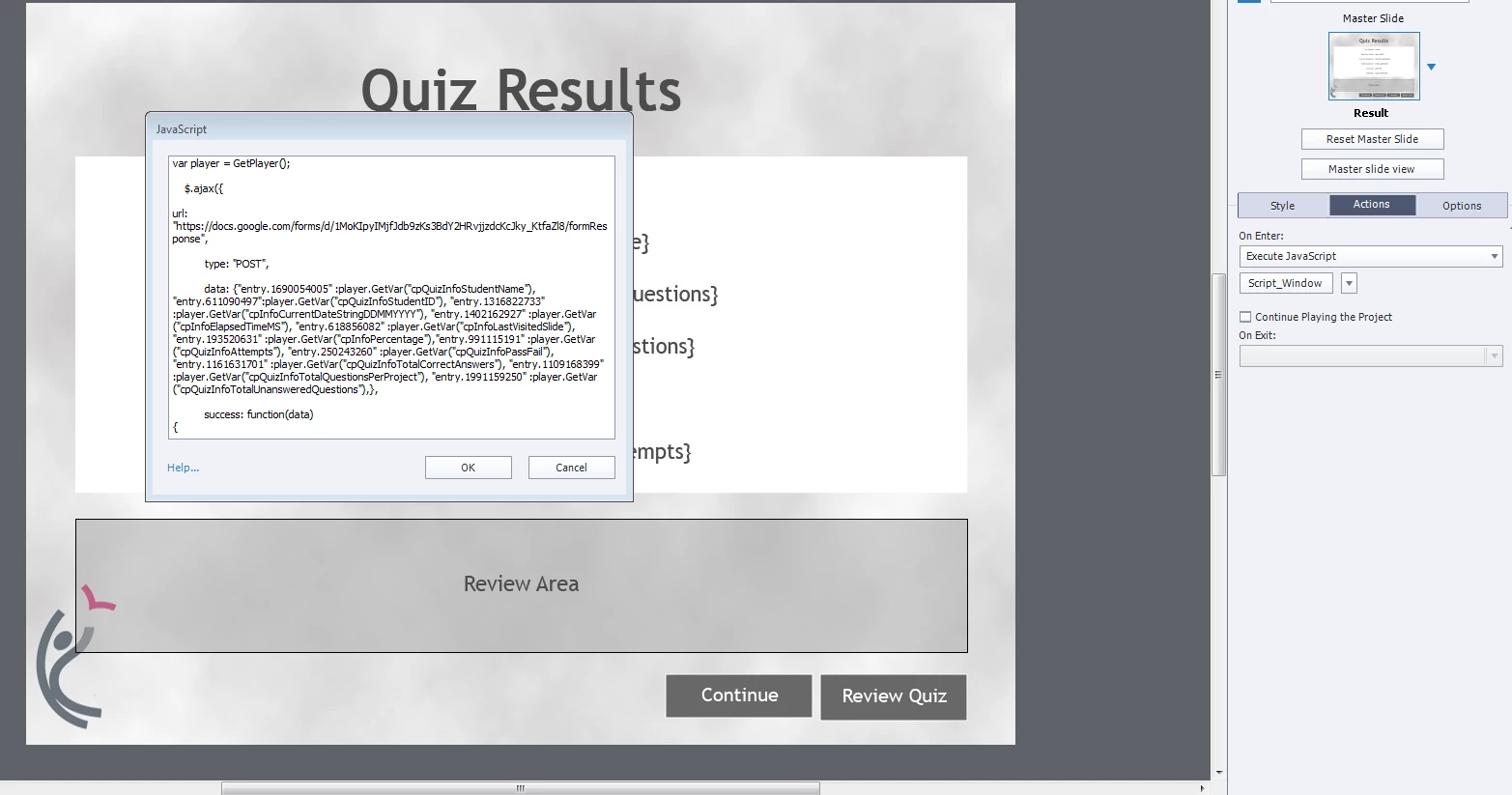
Finally, when I publish the package (unzipped) I add in a final piece of script into the index.html file:

<script src="//code.jquery.com/jquery-1.11.0.min.js"></script>

I have tried numerous times to upload the package to the LMS system (we use ItsLearning) and have it set to SCORM API communication.

However, each time the data will not pull through and the form remains empty:
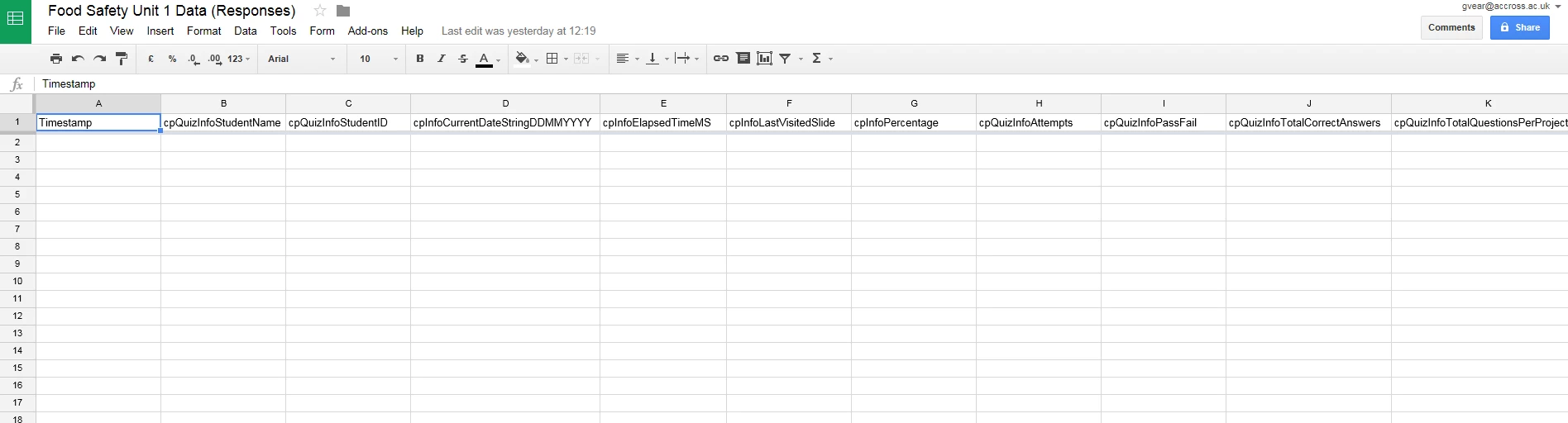
I have spoken to guy who gave me the original code and he thinks I may have to duplicate the default variables incase the form doesn't recognize it. (apparently this is an issues in storyline) however I have no idea how to go about this?

Can anybody help me or guide me in the right direction.

thanks

Gary

This topic has been closed for replies.

2 replies

TLCMediaDesign
Inspiring
June 3, 2016

The first line var player = GetPlayer();  is for Articulate only, you could change it to:

var player = window.cpAPIInterface

Then everywhere it says  player.GetVar, change it to:

player.getVariableValue

Also, is the key the key you got from google docs?

Did you set up the google docs script for all of the variables you are sending?

Participant
June 3, 2016

Thank you for the help! Here's what I have...

var player = window.cpAPIInterface   
    $.ajax({
url: "https://docs.google.com/forms/d/1Au2ThWq3ejgfvnNZnjjdVIhktsZX6c-PU3Om9PzKM20/formResponse",
           type: "POST",
dataType: "jsonp",
           data: {"entry.393583531" :player.getVariableValue("Resistor_Content_Viewed")},
           success: function(data)
           {
               alert(data);
           }
         });

    return false;

When I publish my course, it does not work. I haven't posted it to a web server yet, though. Could that be a problem?

Callie

TLCMediaDesign
Inspiring
June 3, 2016

Yes, that could be a problem.

Do you have the script that is in google docs?

This is an example that I use. This is the script in Captivate, I deleted the key:

function writeStorage()

{

var sheetURL = 'Enter your key here';

var d = new Date();

var n = d.toDateString() + " " + d.toLocaleTimeString();

var quizPoints = window.cpQuizInfoTotalQuizPoints - window.cpQuizInfoPreTestMaxScore; 


var a = window.cpInfoProjectName;

var b = window.cpQuizInfoStudentID;

var c = window.cpQuizInfoStudentName;

var d = window.cpQuizInfoPretestPointsscored + "/" + window.cpQuizInfoPreTestMaxScore + " " + passFail;

var e = window.cpQuizInfoPointsscored + "/" + quizPoints + " " + passFail;

var f = n;

if ( !preTestAttempted )

{

  d = 'NA'

}

if ( !postTestAttempted )

{

  e = 'NA'

}

var xhttp;

if ( window.XMLHttpRequest )

{

  xhttp = new XMLHttpRequest();

}

else

{

  xhttp = new ActiveXObject( 'Microsoft.XMLHTTP' );

}

xhttp.open('GET', sheetURL + '?id=' + a + '&hid=' + b + '&name=' + c + '&pretest=' + d + '&posttest=' + e + '&tDate=' + n, true);

xhttp.send();

xhttp.onreadystatechange = function ()

{

  if ( xhttp.readyState == 4 && xhttp.status == 200 )

  {

   //var msg = JSON.parse(xhttp.responseText);  

   console.log( xhttp.responseText )

  }

}

}

Participant
June 2, 2016

Hey Gary,

I also have this question. I have done this via storyline, but I'm not sure how to do the same on captivate. If you figured this out, I'd love to know.

Callie