
Inspiring
January 20, 2017
Answered

Communication with web object

  • January 20, 2017
  • 1 reply
  • 2745 views

Hi,

I`m using Captivate 9 and publish in HTML5.

I have a Captivate course ("Course 1"). Within that course I embed another Captivate course ("Course 2") as a web object. Now I try to communicate between these to courses, i.e. I want to transmit the values of specific variables between the two courses. There have been several postings about this topic in this forum however it still doesn`t work.

This is what I`m doing:

In the embedded course (Course 2) I define a Captivate variable with the name variable_embedded and the value 5. In the "exterior course" (Course 1) I define a Captivate variable with the name variable_exterior without a value (or with any value).

Now I have a button in the embedded course. Clicking that button will execute the following JavaScript (via the Common JS Interface):

window.parent.window.cpAPIInterface.setVariableValue("variable_exterior", variable_embedded);

What I want to happen is that the variable_exterior takes the value of the variable_embedded (i.e. 5 in our example). However it doesn`t work. What am I doing wrong?

And additional question: How can I transmit the value of a variable the other way round - from the exterior course to the embedded course?

Thank you very much in advance for any help! I really appreciate the time you take for this!
    This topic has been closed for replies.
    Correct answer donalall

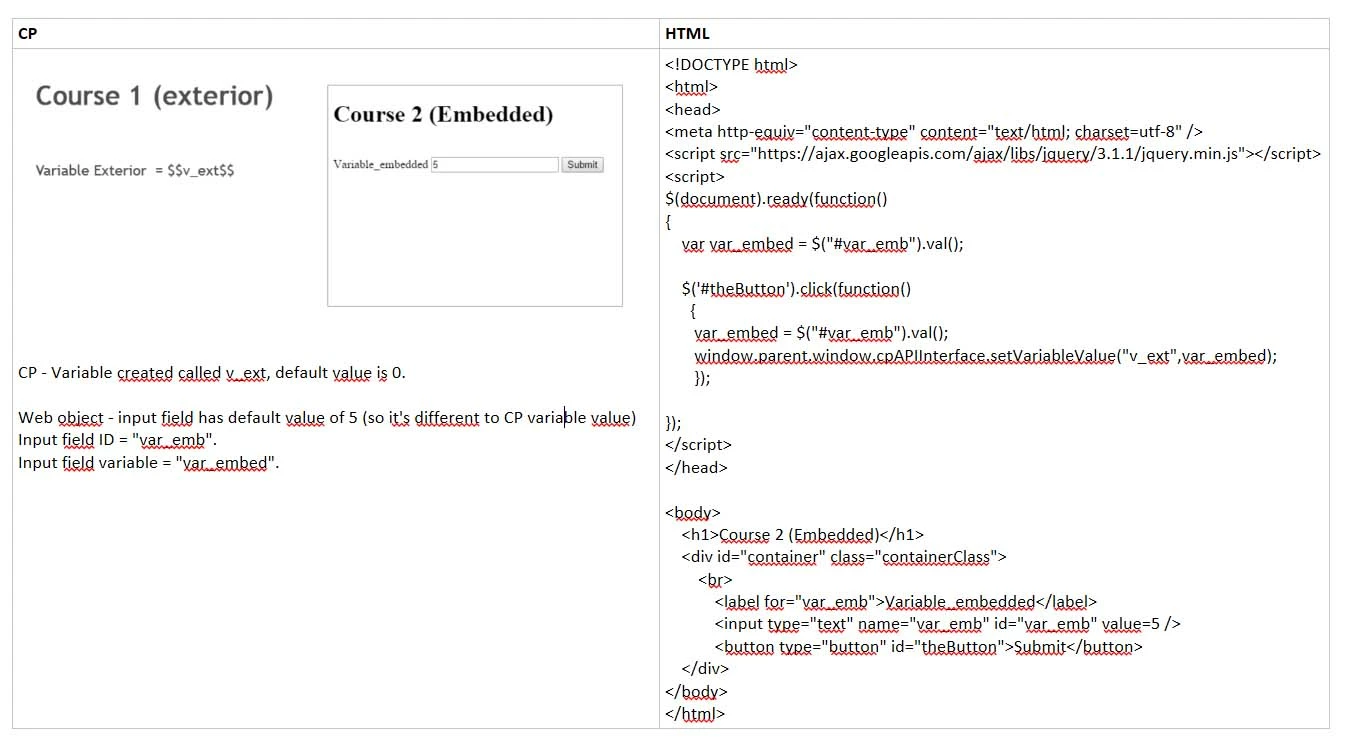
    When you insert a web object in a Captivate (CP) slide it's inserted into an iFrame in Captivate.

    Here's a solution for your iFrame talking to CP issue - it worked for me.

    In this example the web object is a HTML page.

    i.e. In HTML page enter a number in an input field and click the Submit button.

    Clicking the Submit button updates the variable value on the CP slide to match the one on the HTML page.

    See image and code below.

    Based on this you should be able to work out a CP talking to iFrame solution.

    If someone has a better solution please post it.

    Regards

    Donal.

    HTML CODE

    <!DOCTYPE html>

    <html>

    <head>

    <meta http-equiv="content-type" content="text/html; charset=utf-8" />

    <script src="https://ajax.googleapis.com/ajax/libs/jquery/3.1.1/jquery.min.js"></script>

    <script>

    $(document).ready(function()

    {

        var var_embed = $("#var_emb").val();


        $('#theButton').click(function()

          {

           var_embed = $("#var_emb").val();

           window.parent.window.cpAPIInterface.setVariableValue("v_ext",var_embed);

           });


    });

    </script>

    </head>

    <body>

        <h1>Course 2 (Embedded)</h1>

        <div id="container" class="containerClass">

            <br>

                <label for="var_emb">Variable_embedded</label>

                <input type="text" name="var_emb" id="var_emb" value=5 />

                <button type="button" id="theButton">Submit</button>

        </div>

    </body>

    </html>

    1 reply

    donalallCorrect answer
    Inspiring
    January 24, 2017

    When you insert a web object in a Captivate (CP) slide it's inserted into an iFrame in Captivate.

    Here's a solution for your iFrame talking to CP issue - it worked for me.

    In this example the web object is a HTML page.

    i.e. In HTML page enter a number in an input field and click the Submit button.

    Clicking the Submit button updates the variable value on the CP slide to match the one on the HTML page.

    See image and code below.

    Based on this you should be able to work out a CP talking to iFrame solution.

    If someone has a better solution please post it.

    Regards

    Donal.

    HTML CODE

    <!DOCTYPE html>

    <html>

    <head>

    <meta http-equiv="content-type" content="text/html; charset=utf-8" />

    <script src="https://ajax.googleapis.com/ajax/libs/jquery/3.1.1/jquery.min.js"></script>

    <script>

    $(document).ready(function()

    {

        var var_embed = $("#var_emb").val();


        $('#theButton').click(function()

          {

           var_embed = $("#var_emb").val();

           window.parent.window.cpAPIInterface.setVariableValue("v_ext",var_embed);

           });


    });

    </script>

    </head>

    <body>

        <h1>Course 2 (Embedded)</h1>

        <div id="container" class="containerClass">

            <br>

                <label for="var_emb">Variable_embedded</label>

                <input type="text" name="var_emb" id="var_emb" value=5 />

                <button type="button" id="theButton">Submit</button>

        </div>

    </body>

    </html>

    Inspiring
    February 2, 2017

    Thank you very much for this great answer! I discovered your answer only now, that`s why I`m answering that late.

    I tried your solution and it works perfectly fine!

    Could you also give me a little hint how to do it the other way round (CP talking to iFrame)? This would be extremely helpful!

    (This is maybe related with my new question in Change URL of web object which addresses the problem of dynamically change the contents of a web object.)

    So thanks again for your answer!

    Inspiring
    February 2, 2017

    @michaelm:

    1. Please mark "my answer" as correct to help other people (you marked it as helpful).

    2. re: "Change URL of web object" query - there are quite a few suggestions given. You need to respond to say if one of these solves your problem.

        If it doesn't then you have to give more information about your problem so people can help you e.g. scrrenshots of what you want to show. You may run into problems if the web objects are http web pages that are in a different domain to your web server. This Adobe link gives some information at the bottom of the page.

    3. Example of CP talking to iFrame shown below:  (Web Objects are inserted as iFrames on CP slides)

    iFrame - WebObject (a HTML page)

    !DOCTYPE html>

    <html>

    <head>

    <script src="https://ajax.googleapis.com/ajax/libs/jquery/3.1.1/jquery.min.js"></script>

    <script>

    $(document).ready(function()

    {

      window.parent.updateAge = function()

    {

        // creates JS var "newAge" from CP "v_age" variable

        var newAge = window.parent.window.cpAPIInterface.getVariableValue("v_age");

        // Updates iframe Age field

        $("#age").val(newAge);

    }

    });

    </script>

    </head>

    <body>

    <label for="age">Age</label>

        <input type="text" name="age" id="age" value=0 />

    </body>

    </html>