Participant
January 2, 2018
Answered

Completion status

  • January 2, 2018
  • 1 reply
  • 740 views

The user exits the course without finishing the quiz. The course shows status completed also user did not fulfill all completion criteria.

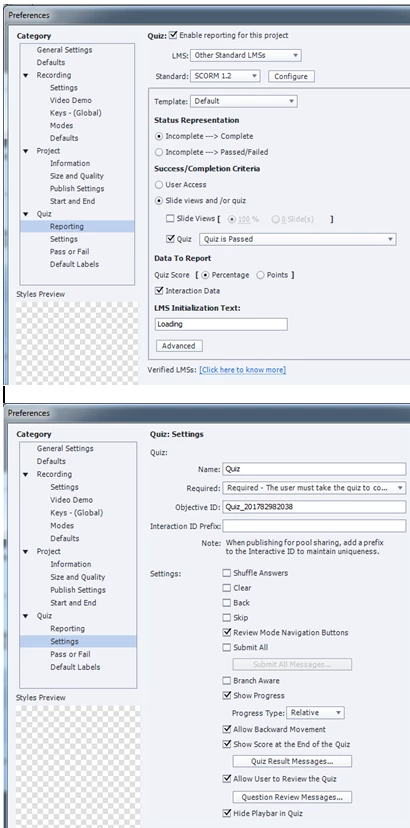
My reporting settings are: status representation: incomplete -> complete; success/completion criteria: slide views and Quiz is passed.

I have not indicated how many slides user must view. The problem is, that if the user only views a few slides and exits the course, a message pops up informing that the course is completed.
This topic has been closed for replies.
Correct answer RodWard

I really appreciate your help in this matter.


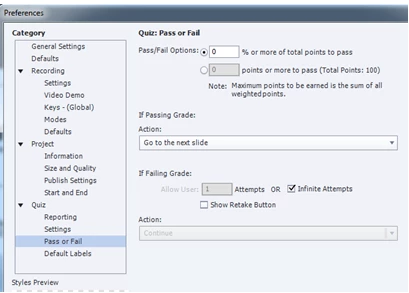
You have your Pass/Fail percentage set to 0%.

That's probably why it's being marked Completed without the user doing much at all.

Don't you think it should be higher than 0?

1 reply

RodWard
Community Expert
Community Expert
January 2, 2018

This may be due to your LMS not interpreting the data in a way that you expect.

Try uploading the same SCORM zip to SCORM Cloud and see what the results are there.  If it differs from your own LMS, then you know where the problem is.  Trust SCORM Cloud to give you the right answer.

Participant
January 2, 2018

Thank you Rod for this quick respond. I did preview in Scorm Cloud and this is the result:

If I read it correctly, the status is completed after the third slide that I viewed. Can you suggest what I need to change in the course settings in order to first view the quiz before gaining status completed?

RodWard
Community Expert
Community Expert
January 2, 2018

Can you please show a screenshot of your Quiz > Reporting setting?