Inspiring
January 4, 2016
Question

Conditional Action says it's not curently in use

  • January 4, 2016
  • 2 replies
  • 750 views

I was demonstrating for some new Captivate users how Conditional Actions move from one decision to the next when I found that changes I was making in the conditional action were no longer being triggered. I couldn't figure out why until I pressed the Usage button in the Advanced Action and got a message that "Item is not currently in use." The file only has one button which is set to use the Advanced Action which you can see in the image below. If I change the button's On Success to something else and then change it back to the Action it will then show that the button is using the Advanced Action, but Captivate acts like the Advanced Action isn’t in use until then.
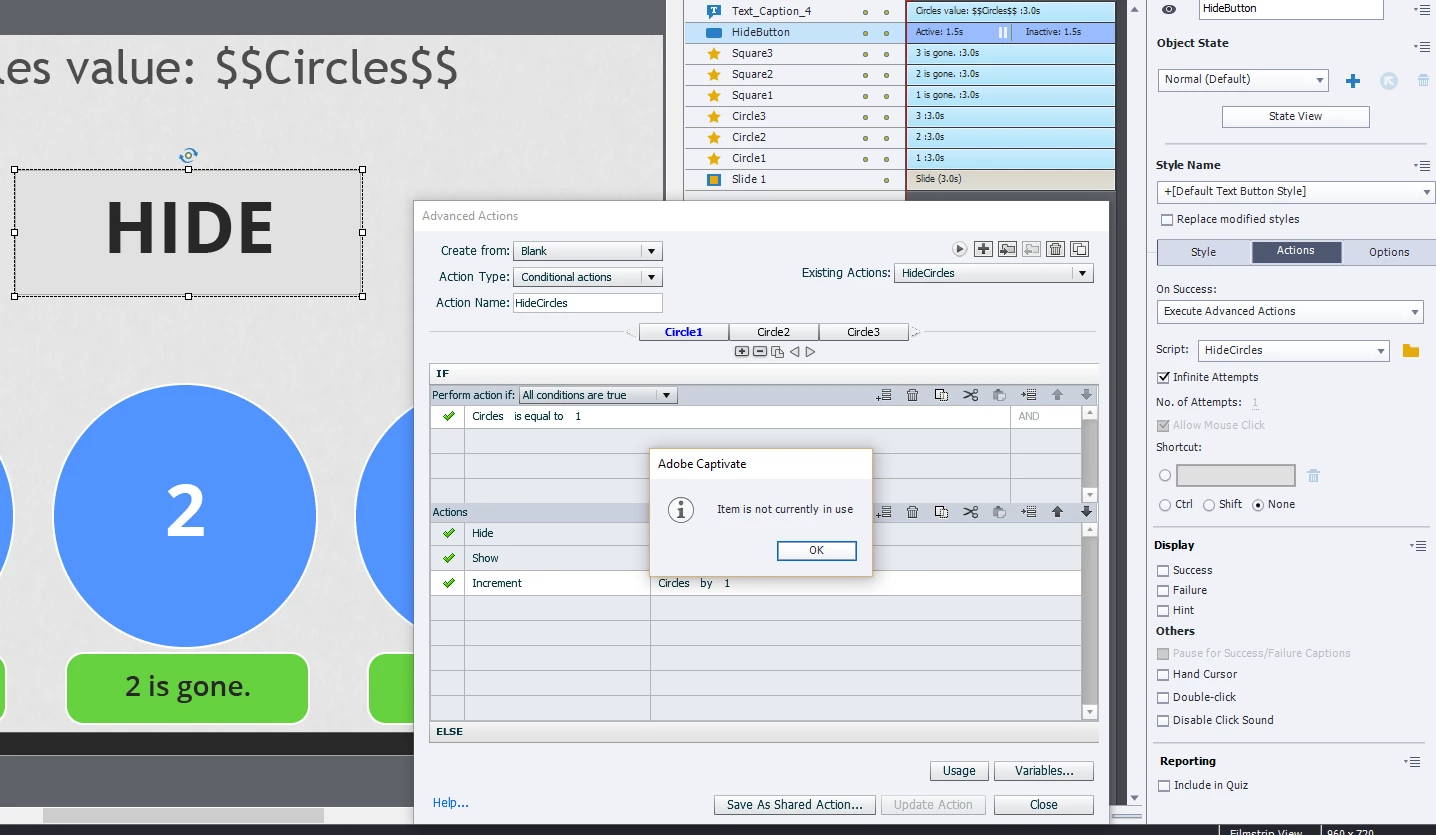
If anyone wants to take a look at the file I've uploaded it here, http://s000.tinyupload.com/?file_id=47531717665755537078

    This topic has been closed for replies.

    2 replies

    Lilybiri
    Legend
    January 4, 2016

    The sequence of the decisions in the conditional action should be reversed, as David points out. It is a pretty frequent bug made by advanced actions users, as this example I posted a while ago on my blog points out. The described use case shows exactly the same lack of logic. Contrary to most programming languages all conditions are evaluated in a conditional advanced action, you never get out from that action if a condition proves to be true.

    Blog after Posterous? - ClickClick - Captivate blog

    However this is not explaining the issue you have with Captivate telling the action is not used. Possible causes can be:

    1. Decision names (Circle1, Circle2....) are already used as object names from what I see on the screenshot; this can cause such problems, change one of the characters to a capital or insert an extra character like _
    2. There is corruption on the slide

    You should have been able to see the value of the variable (would prefer v_circles for same reason, to avoid double use of names) since you inserted it in a text container.

    TLCMediaDesign
    Inspiring
    January 4, 2016

    This would be a great addition to Captivate to have an option for Action Type: Conditional Case, Using this would "break" from the action when a condition is met.

    While reading your blog, I have a question. If you have an advanced action triggered onEnterSlide, but you use micronavigation to "resrtart" the slide. How do you get the onEnterSlide action to trigger again without using JavaScript behind the scenes?

    I know it's possible to micronavigate to the first frame of the current slide minus 1, but you have to make sure that there is nothing on the last frame of the previous slide.

    Lilybiri
    Legend
    January 4, 2016

    David, indeed, that is my way described in Replay Slide?

    Replay (slide) Button - Captivate blog

    Will soon publish another one about states in Drag&Drop where I used same approach to reset the slide.  There is sometimes an issue with flickering, even if you don't have anything on the last frame. For D&D you cannot add 'Go to Next Slide' as I did for the Replay2 button in the mentioned blog post. That is why you'll see flickering, which was not the case for the example movie in the Replay Slide post.

    Of course, JS will do it better, but treshold is higher for most users than the simple point-and-click advanced actions. I agree with your proposition for Case totally, but would already be happy with a simple loop as well. Up till now I mostly could fix each advanced action I had to debug without using JS. It is just about knowing the logic of Captivate.

    TLCMediaDesign
    Inspiring
    January 4, 2016

    What version of CP?

    Even when the action runs wouldn't the last condition always run since the variable is incrementing?

    I.E.:

    Condition: Circle1

    if Circle = 1;

    Show Circle 1, increment Circle

    Condition: Circle2

    if Circle = 2; "Since Circle was incremented it is now 2"

    Show Circle 2, increment Circle

    And so on...