
Known Participant
September 3, 2015
Question

Conditional Actions

  • September 3, 2015
  • 3 replies
  • 1066 views

Hi there Captivate collective.

I'm using Captivate 9.

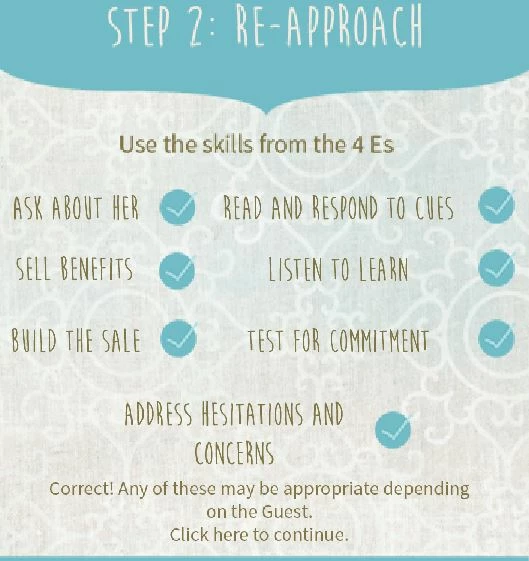
I have 7 headings on a screen. When you click on any of these headings, the blue check mark should appear next to that heading.

After you have clicked on, let's say two or three of these headings (and see the check mark), the text 'Correct! Any of these may be appropriate...' should appear (I currently have this text set up as a button)

Next, I need for either that 'Correct' script, or some other button to appear which will allow the user to click and continue the presentation.

I simply cannot get this to work.

Please let me know what variables, and actions to create.

Thank you!
This topic has been closed for replies.

3 replies

Known Participant
September 18, 2015

As educational as that link is that you shared Rod, it unfortunately didn't help.

I am definitely making use of Advanced actions and variables. The problem is I cannot figure out the right construct of variables and advanced actions to make this work.

To recap the issue:

Of the 7 headings (the ones that have checkmarks), any TWO of those should be clicked before the user sees the text "Correct! Any of these may be appropriate..."

Of the 7 headings, the checkmarks should appear on click.

After the "correct" text appears, the user needs a way to navigate to the next slide.

If someone has a sample slide that contains these advanced actions, or can help me set it up, that would be appreciated. Here's what I had done.

and the second screen of the advanced action

Lilybiri
Legend
September 18, 2015

Rod will certainly help, since you don't want to use states, I'll keep away. I just want to ask one question: the button (click box?) has the same label as the variable it is associated with? Don't do that, each label should be unique.

Lilybiri
Legend
September 4, 2015

Since you are on Captivate 9, I certainly would use states and shared actions in this case. You can take the approach explained by Rod, have several examples on my blog as well but it would save time and make management easier if you used the new features. I plan to write out a blog post, but it is not yet written, sorry.

Will you allow the user to click several times on the same header or not? That is pretty important. If you don't allow multiple clicks, one variable v_counter will do the trick. If you allow multiple attempts you'll need a user variable for each heading.

You have to turn each heading into a button (use a shape button that has that text as label), and that button should trigger a shared conditional action.

RodWard
Community Expert
Community Expert
September 4, 2015

Take a look at this tutorial.  It explains how to do this.

Create a Dynamic Menu Slide in Adobe Captivate | Infosemantics Pty Ltd