
Participating Frequently
November 26, 2019
Answered

Conditional formatting/multi-state objects/multiple options

  • November 26, 2019
  • 2 replies
  • 1115 views

Group, I am hoping someone can point me to a blog or youtube video I have missed in my hours of research.

Objective: 7 options on a slide. The learner clicks the right ones. If it is right, it goes green and if it is wrong it goes red. See image below.
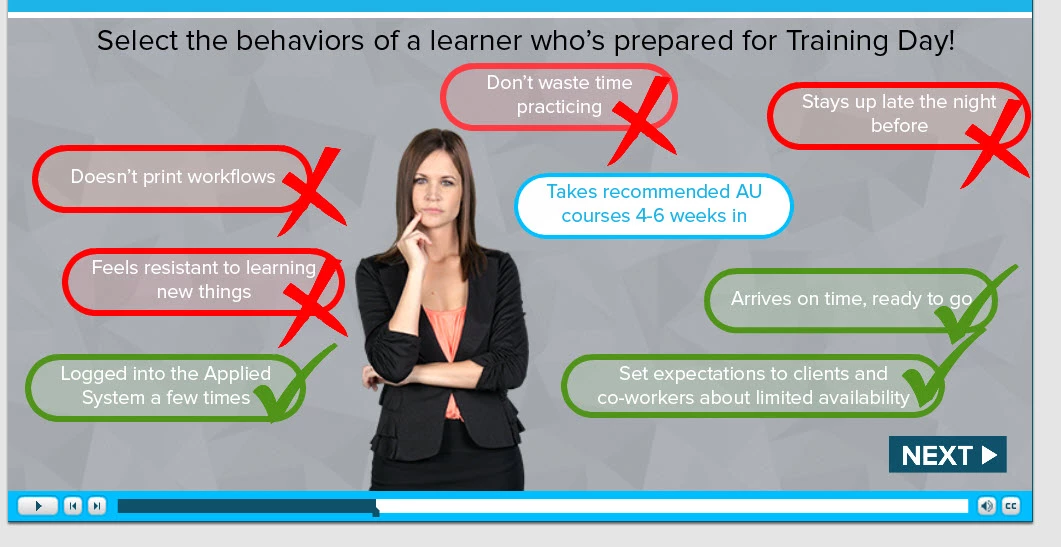
I taught myself this, my first problem. Everytime I play it, it will not allow me to select all the answers. It just stops. Does someone have a good example on which to go off of for the actual If statements????
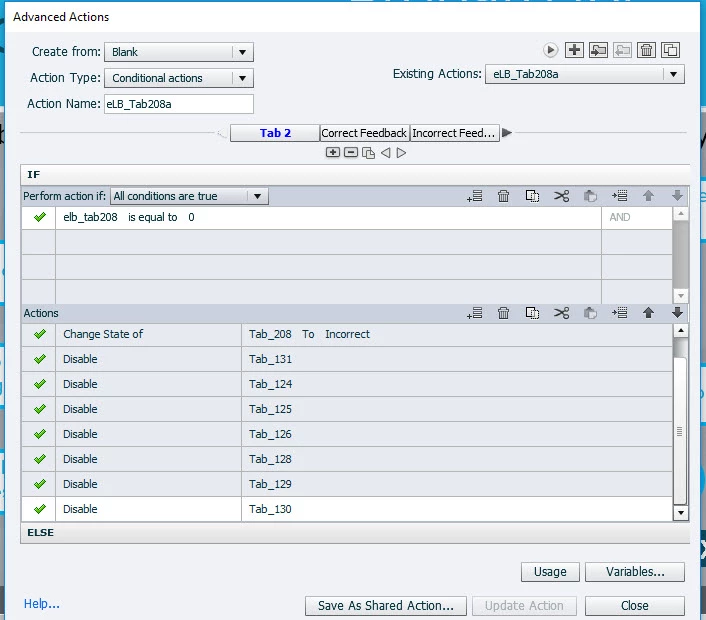


Please dear God someone have pity. I'm not looking for the answer, but maybe an example on how to properly do it.
 
Thank you!!!!Angela
 
This topic has been closed for replies.
Correct answer Stagprime2687219

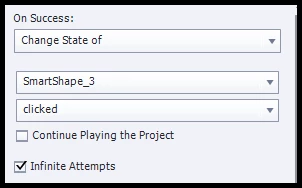
I thought return to quiz meant the slide. So I correct that. My biggest problem is when i click on a button, the color doesn't change util i move my mouse to another area.


Do you have these options on the right side? This is all I did to try and replicate the issue. Changes immediately.

2 replies

Stagprime2687219
Legend
November 26, 2019

Hmm...

Looks like you're trying to modify an ELearning Brothers template perhaps...?

That could be tricky if you are not familiar with how it is designed to work.


My approach would be to create my seven options as buttons that when clicked simply change state to the green or red as appropriate. If you need to increment some sort of variable for right and wrong selections, that can be done too.

Not sure what the if statements are meant to check as the naming convention is not helpful.

Depending on what else you need to have done - the solution could change - but right now you are kinda bound to the original design.

Participating Frequently
November 26, 2019

I am using Captivate 9. STAGPRIME, in the meantime, I did exactly what you said. I started over and simple.  When I play it, and click on a button some won't change until i move the mouse and others change immediately upon click. I have copied the action, to ensure consistency.

Lilybiri
Legend
November 26, 2019

Hmm... Do you know the meaning and functionality of the command 'Return to Quiz'? It is only meant to be used in Remediation situation. This means, when a user fails a question, he will be navigated to a content slide. That content slide has a Next button which can have the Return to Quiz command. If the learner gets to the content slide from a quiz slide he will be returned to the quiz slide using that button. If the learner did not come from a quiz slide, the Next button will go to the next slide.

What did you expect when using this command? 

Lilybiri
Legend
November 26, 2019

You are using an old version of Captivate, which one?

Please show the FULL advanced action, this is only the THEN part of the first decision. Use the Preview button, which is the first button in the top control panel of the dialog box, looks like an arrow. At least it will allow to see some more of this action.


Moreover would need to know which event is used to trigger this action? Post also a screenshot of the timeline, please.

Participating Frequently
November 26, 2019

I think I tried copying a design that was way to complicated. I want them to click on a button, get immediate feedback, click on the next and continue. No quiz, no scoring.

Lilybiri
Legend
November 26, 2019

But you are a command 'Return to Quiz' which is typical for a quiz situation. See my explanation after the recent actions screenshot.