
Known Participant
April 18, 2018
Question

Conflict with three separate audio buttons (Stop / Play / Pause)

  • April 18, 2018
  • 2 replies
  • 1055 views

Hello,

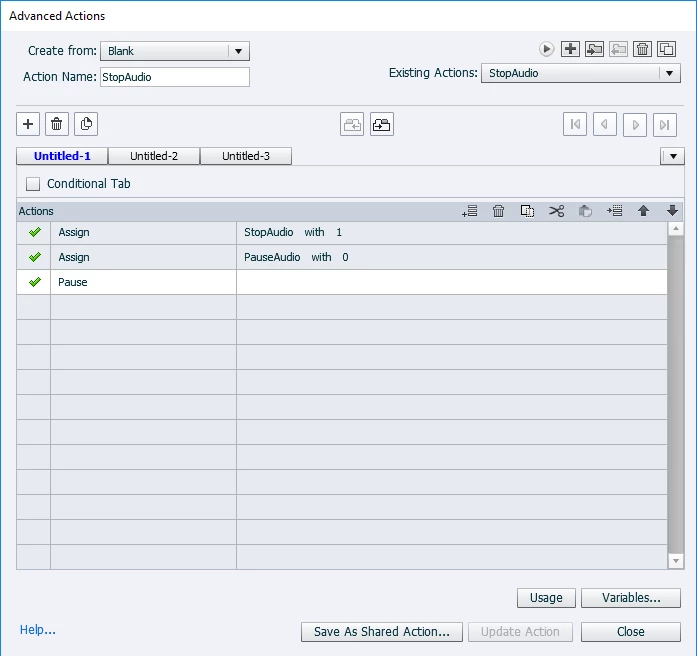
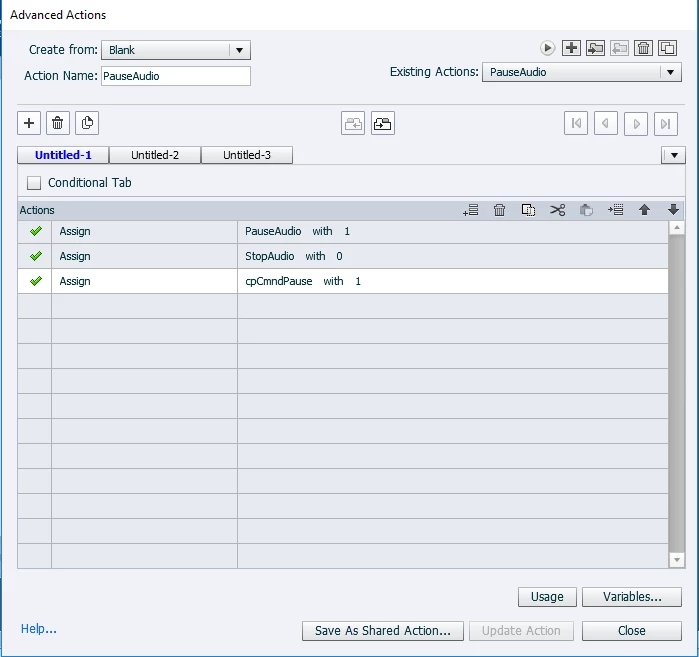
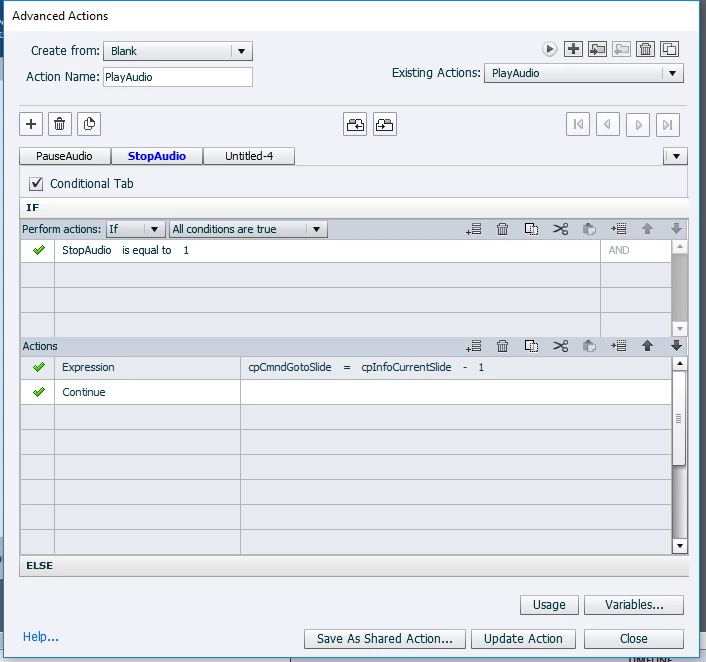
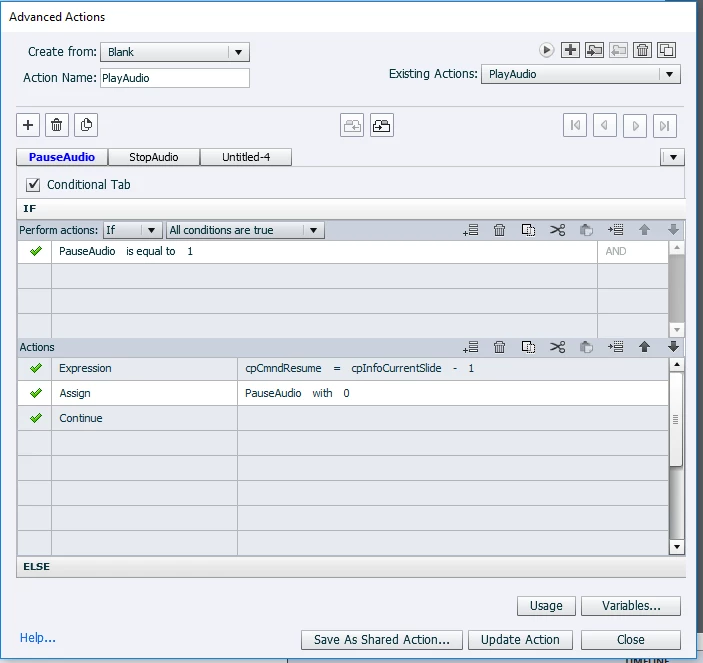
I am in a bad loop and I can't seem to get a slide to resume playing after hitting the pause button.  The stop buttons works. The Play button works by restarting the slide after the stop button is pressed or the slide ends. The pause button works by pausing the audio. But it will not resume when the play button is pressed after clicking on the pause button. Issue: My script doesn't resume play (by pressing play) after the pause button was pressed.

Stop Button Advanced Action (works😞
Pause Button Advanced Action (works😞
Play Button Advanced Action (Plays after Stop is pressed - works)
Play button Advanced Action (Plays after Pause is pressed - doesn't work)
    This topic has been closed for replies.

    2 replies

    sabre123
    Participating Frequently
    April 18, 2018

    In your Play button action, you're assigning a value to cpCmndResume that can be a value that is neither true or false. cpCmndResume should be either a 0 or a 1. 1 resumes playback.

    If after changing that, you find that is still doesn't resume, on the Play button object, tick the box that says, "Continue playing project" and see if that fixes things. If it does, remove your expression and remove "Continue" in your Play button action.

    Lilybiri
    Legend
    April 18, 2018

    I don't really know what you want to do but I see a seriiouss bug: you do use the same name for a variable and an action. That is not allowed.

    If you use the command Pause, the slide audio will be paused and the system variable cpCmndPause will automatically be toggled to 1. Why do you need another user variable? If you use the command Continue, the system varialbe cpCmndResume is automatically toggled to 1, and cpCmndPause to 0.  What is for you the difference between Stop and Pause? Can you explain, to me that is exactly the same but I'm not a native English  speaker.

    Are you new to AA? Can you please use the Preview button to show the whole action with all decisions instead of all those screenshots which make it very hard to see the full pciture. The Preview button is the first button in the top right control panel (arrow-like).

    Why do you restart the slide for StopAudio?   The last expression doesn't make sense at all: cpCmndResume is a Boolean, it can only have the values 0 or 1, why do you use a slide number to set it?

    Known Participant
    April 18, 2018

    Hello,

    Thank you for your reply. I am trying to control the slide's audio. Each slide is static and has three buttons Stop, Play, and Pause.

    The Pause button pauses the audio on the slide. So that when the user clicks on Play button again is continues on from where it was paused.

    The Stop button stops the audio and if you press play it restarts the audio.

    The Play button also restarts the audio if pressed at the end of the narration.

    sabre123
    Participating Frequently
    April 18, 2018

    If it's Slide audio, it doesn't matter whether or not you're using a static image. You're playing, pausing, and stopping the timeline with your buttons...not specifically an audio file.