
Participant
May 31, 2018
Question

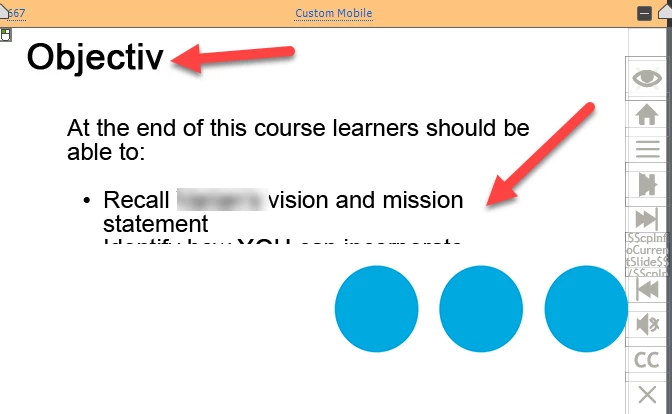
Content distorted in Responsive Project

  • May 31, 2018
  • 1 reply
  • 141 views

I am currently using one of the Adobe Responsive Templates to recreate a former course created in Captivate.

When I click on the various responsive options: Custom Tablet, Customer Mobile, ect. the words and images are being cutoff.

How do I prevent that from happening
    This topic has been closed for replies.

    1 reply

    Lilybiri
    Legend
    May 31, 2018

    May I ask some quetions? Which version do you use? It is clearly a Breakpoint Views workflow, not Fluid Boxes. You talk about a 'responsive template'. Do you mean a responsive theme? AFAIK no templates are packaged with Adobe Captivate. Or are you talking about a template from an external source like eLearning Brothers? If yes, please ask about it in their website.

    For Breakpoint views the font sizes for each breakpoint are defined in the Object Style Manager: can you check and eventually edit to a lower font size?

    Size and location of all items are defined in the Position Properties.