August 14, 2012
Answered

Converting captivate file to .flv format

  • August 14, 2012
  • 1 reply
  • 2655 views

Hi we have created a project using Adobe Captivate 6.  We published it in a .exe format and shared that with our client.

Our client now wants us to provide a .flv file as well. We werent able to figure out any way to do this.

Please help. Urgent
    This topic has been closed for replies.
    Correct answer Lilybiri

    I hope you are aware that FLV is a video format, which means that all interactivity that you perhaps have in the EXE file will be lost.

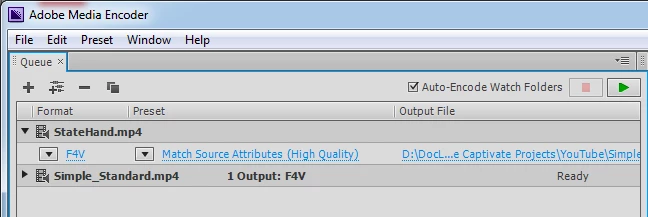
    Publish to Media, MP4. I think Captivate ships with the Adobe Media Encoder (at least a minimal versoin, because video inserted in CP are always converted) that will allow you to convert MP4 to FLV or F4V (better if your client accepts).

    1 reply

    Lilybiri
    LilybiriCorrect answer
    Legend
    August 14, 2012

    I hope you are aware that FLV is a video format, which means that all interactivity that you perhaps have in the EXE file will be lost.

    Publish to Media, MP4. I think Captivate ships with the Adobe Media Encoder (at least a minimal versoin, because video inserted in CP are always converted) that will allow you to convert MP4 to FLV or F4V (better if your client accepts).

    August 14, 2012

    Great. Once again utmost thanks for the quick reply Lilybiri.  You have always been a life saver.

    Right, that is exactly what we had done earlier.  We were also wondering about the loss of interactivity which you clarified does happen. Dont know why but the client wants .flv only. Anyway, that clarifies our doubts. Thanks for the help.

    By the way, regarding .swf formats. The client also wants a .swf format. We know how to do that. However, we wanted to check the .swf file at our end also.  How do we do that? Suppose we dont want to view it in a browser?? In case we want to view it in a standalone player? Is there any free one that we can use to run the .swf file and not Adobe Flash Professional?

    Erik Lord
    Inspiring
    August 14, 2012

    When you publish the piece 'normally', you get a SWF file along with the HTML file...so that SWF file should be what you need....right?

    You want to 'check the swf file'...not sure what that means... Without the accompanying HTML file, you should always be able to drop the SWF on top of an open browser window to play it back...

    But to just open a SWF without a browser at all, I don't think you can do that without have Flash Pro itself installed.