
Participant
May 30, 2019
解決済み

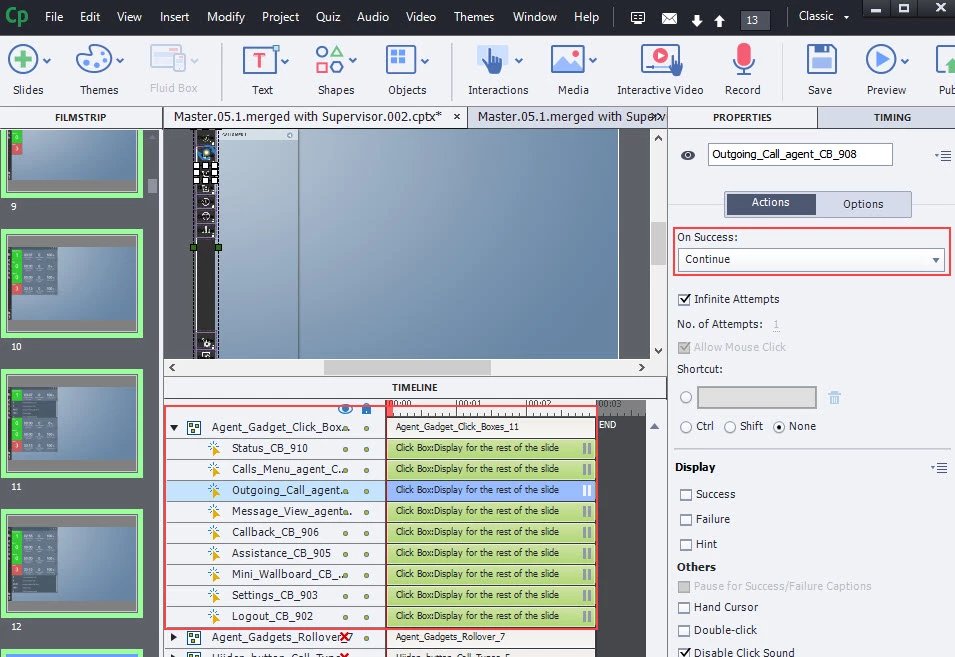
Copying groups of Click Boxes to a new slide does not keep their target actions?

  • May 30, 2019
  • 返信数 1.
  • 281 ビュー

I have created a bunch of click boxes that each jump to a different slide. Those buttons were then grouped together in my timeline since there are so many. When I copy that group to a new slide, instead of showing that they jump to the specific slides, they just show "continue" instead. What am I doing wrong?
    このトピックへの返信は締め切られました。
    解決に役立った回答 Lilybiri

    Which version are you using please?

    Will not try to explain the mechanism why this is happening... about unique identifiers etc.


    But I'll offer an alternative with a lot less work (there are multiple alternatives, but keep this to simple actions like you):

    • Replace the click boxes by shape buttons
    • Time the shape buttons for the rest of the project, always on top.

    You'll have the same instance of the shape button now on each slide, and with exactly the same action.

    Another alternative is to put the shape buttons on the used master slide(s).

    BTW: you can time a group for the rest of the project. You can always Hide the group or one or more items in the group using the On Enter action of a slide. All have now a unique identifier.

    返信数 1

    Lilybiri
    Lilybiri解決!
    Legend
    May 30, 2019

    Which version are you using please?

    Will not try to explain the mechanism why this is happening... about unique identifiers etc.


    But I'll offer an alternative with a lot less work (there are multiple alternatives, but keep this to simple actions like you):

    • Replace the click boxes by shape buttons
    • Time the shape buttons for the rest of the project, always on top.

    You'll have the same instance of the shape button now on each slide, and with exactly the same action.

    Another alternative is to put the shape buttons on the used master slide(s).

    BTW: you can time a group for the rest of the project. You can always Hide the group or one or more items in the group using the On Enter action of a slide. All have now a unique identifier.

    Fazools作成者
    Participant
    May 30, 2019

    Lilibiri,

    Sorry, meant to add the version. 

    2019 (11.0.0.243) for PC

    I love your idea! Thank you! Will give it a go now.

    Lilybiri
    Legend
    May 30, 2019

    Please, also upgrade to 11.0.1.266!