

Count Down Timer
...
Hello Captivaters !... 🙂
I'm working on Mental Maths Test and I need a Count Down Timer on the slides...
My project is based on the usual Captivate questions slides (to randomize the questions) and I have 4 questions pools.
I managed successfully to limit the time of the questions to 5 seconds with the options...
But as I don't really like the Captivate widgets Timer, I try to add a small animated gif, conting down from 5 to 0...
As I tested it on preview html5, it works perfectly on my default browser which is Mozilla Firefox.
But yesterday, as I tried to share the project with the community, I realized that there was a problem... The animated gif doesn't behave properly on the project I shared. So I tested it with Chrome and with Edge and I realized again that there was a problem...
This morning I try to change the configuration of this animated gif and realize that Captivate, in fact, changed the Gif in a "swf" output... Pffffff... Too bad !...
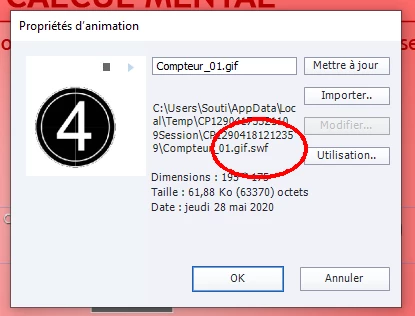
And also Captivate treated it not as an image but as "I don't know what" as the link provided doesn't correspond with the emplacement of the gif in my desktop... Pffffffff again... !!!...( As I can't update it if I want to change the colors, for example, of the original one...)
So my question is : is there a simple way to add a simple count down timer on these slides ?
Thanks in advance !...
😉
...


 AdChoices