leblangs
Participating Frequently
December 4, 2015
Answered

Course stops on second preloader

  • December 4, 2015
  • 1 reply
  • 183 views

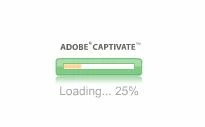
There are two preloaders that are shown at the beginning of a Captivate course being loaded. The first shows the percentage loaded along with a progress bar. The second preloader is a a spinning circle on a black background. Some, but not all, of our users are experiencing a stop in content loading upon reaching the 2nd preloader. Does anyone know what content is being loaded when this second preloader is shown?

This course is published as a SWF. I have included images of the two preloaders.

Thanks!
This topic has been closed for replies.
Correct answer RodWard

The second spinning icon relates to its effort to communicate with the SCORM API in the LMS.  If it cannot communicate with the LMS or find the SCORM API, then it just goes on spinning.

Check whether your users experiencing issues have settings in their browsers that could be blocking this.

1 reply

RodWard
Community Expert
RodWardCommunity ExpertCorrect answer
Community Expert
December 5, 2015

The second spinning icon relates to its effort to communicate with the SCORM API in the LMS.  If it cannot communicate with the LMS or find the SCORM API, then it just goes on spinning.

Check whether your users experiencing issues have settings in their browsers that could be blocking this.