Participant
April 18, 2017
Answered

Cp 2017: Text within Text Captions and text within SmartShapes not resizing in a responsive project

  • April 18, 2017
  • 1 reply
  • 435 views

I am using a trial version of Captivate 2017 to test the new functionality, and am having problems with text not resizing when creating a responsive project. I have added SmartShapes to a Fluid Box, and then overlaid text captions and images onto the SmartShapes. The images, SmartShapes and Text Captions resize perfectly through the breakpoints. However, the text within the Text Captions does not resize. I have tried removing the Text Captions and entering the text directly into each SmartShape, but again the text does not resize.

I currently use Captivate 9 and am a novice in the creation of responsive projects, but I believe that you can at least set the font size etc. across breakpoints using the Object Style Manager. How is this done in Captivate 2017 please?
    This topic has been closed for replies.
    Correct answer Lilybiri

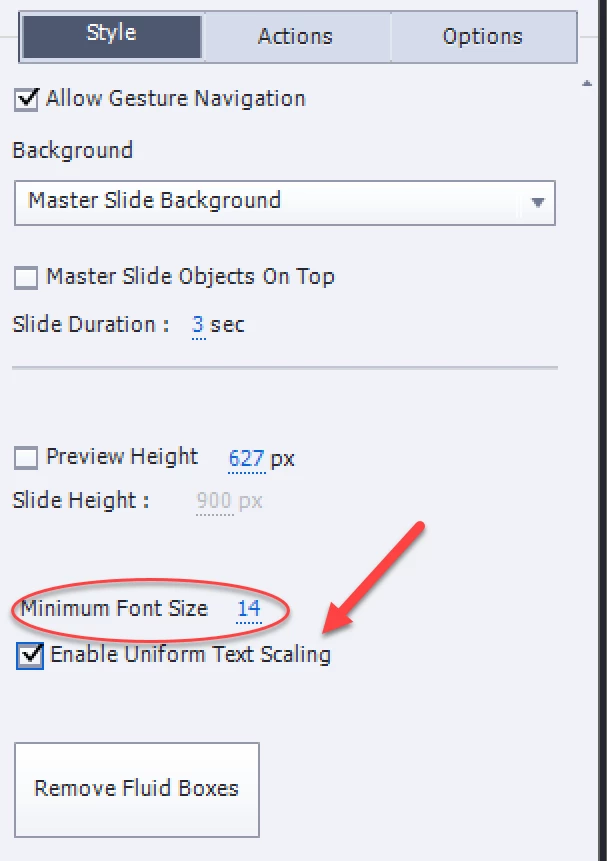
    You have to enable this option, "Enable Uniform Text Sizing' which is available in the Properties panel on Slide level;

    Text will resize until the minimum font size is reached. If you decrease the text container size more, an indicator will appear which users can click to read the rest of the text. Be careful: contrary to CP9 where the object styles for text in the OSM had a minimum font size of 10, the default minimum size in 2017 is 14, and cannot be set in the Preferences, nor in the OSM. It is stored with the project but if you want to make it smaller it has to be changed in each new project, is not stored with a theme or preferences.

    1 reply

    Lilybiri
    LilybiriCorrect answer
    Legend
    April 18, 2017

    You have to enable this option, "Enable Uniform Text Sizing' which is available in the Properties panel on Slide level;

    Text will resize until the minimum font size is reached. If you decrease the text container size more, an indicator will appear which users can click to read the rest of the text. Be careful: contrary to CP9 where the object styles for text in the OSM had a minimum font size of 10, the default minimum size in 2017 is 14, and cannot be set in the Preferences, nor in the OSM. It is stored with the project but if you want to make it smaller it has to be changed in each new project, is not stored with a theme or preferences.

    Participant
    April 18, 2017

    Many thanks Lilybiri. I have Previewed with this option ticked and it works. Out of interest, do you know the reason why text scaling is not visible when using the Preview in dropdown to view the different breakpoints?

    Lilybiri
    Legend
    April 18, 2017

    Because resizing only happens on runtime, which means that it has to be previewed in a browser.