
viktoriar91182761
Participant
June 26, 2018
Question

Cp skips clicks and not hesitating box on the click anymore

  • June 26, 2018
  • 1 reply
  • 133 views

Hi, I am new to the software but made my first video just fine.

Then I tempered with the Properties and lost the ability to height buttons, no matter what I do they not recording anymore.

Another issue is there no recording sound on every click and slides are considerably less number then expecting, skipping steps in software simulation.

I went back to the property, followed the tutorial, but the problem is still there.
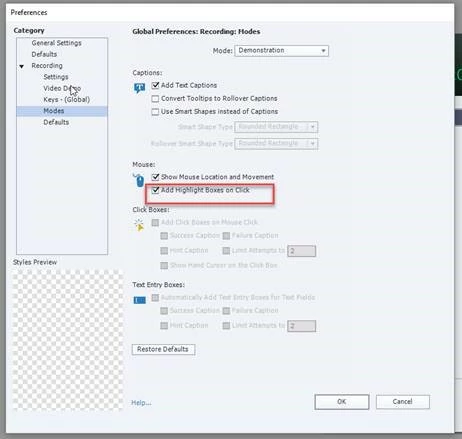
Please let me know if I am missing anything.

Regards

Viktoria

This topic has been closed for replies.

1 reply

Lilybiri
Legend
June 26, 2018

You show the setup for a software simulation in Demonstration mode. Changes to the setup will only be applied to new recordings, not to existing recordings. The screenshot is very tiny and fuzzy..

For which software application did you want to create a simulation?  You talk about click boxes, that sounds like you didn't create in Demonstration but in Training mode? Bit contradictory. When teaching Captivate, I always start with a recording of a simulation and recommend the trainees to record always in 3 modes at once, to learn about the differences between a pure demonstration that will be watched as a passive video, and the two other simulations where click boxes are added and Text Entry Boxes, one interactive object for each slide.

viktoriar91182761
Participant
June 26, 2018

Hi Lilybiri,

The problem is resolved now.

It was caused by me using 3 displays, turning off one of the display helps.