
Gray Susan
Inspiring
February 3, 2020
Answered

CP2017 Error Message

  • February 3, 2020
  • 3 replies
  • 328 views

A coworker just received this error message when working in Captivate 2017.
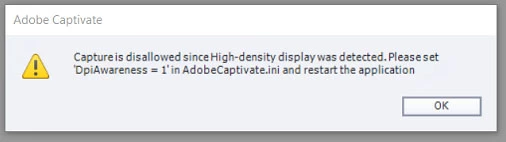
What does it mean and where is that AdobeCaptivate.ini doc reside?  He just told me this was while he was trying to do a video demo.

Thanks,

Susan

This topic has been closed for replies.
Correct answer Lilybiri

It means that a retina screen is detected and the collaborator wante to create a software simulation or a Video Demo. Both require 1px per 1px setting for the monitor. One of the workflows is mentioned, by editing that ini file which is in the installation folder. You need admin rights to edit, and please keep the old file because you'll need to reset it to be able to work in Captivate again after having finished the recording.

3 replies

Lilybiri
LilybiriCorrect answer
Legend
February 3, 2020

It means that a retina screen is detected and the collaborator wante to create a software simulation or a Video Demo. Both require 1px per 1px setting for the monitor. One of the workflows is mentioned, by editing that ini file which is in the installation folder. You need admin rights to edit, and please keep the old file because you'll need to reset it to be able to work in Captivate again after having finished the recording.

Gray Susan
Inspiring
February 3, 2020

Interesting that I've never touched that file but my Captivate works for Video Demo.  

Thank you for your response.

Susan

Lilybiri
Legend
February 3, 2020

You will never see that message if you are not using a retina screen.