
Gray Susan
Inspiring
May 13, 2019
Answered

CP2017 Replay button not working in HTML5

  • May 13, 2019
  • 3 replies
  • 398 views

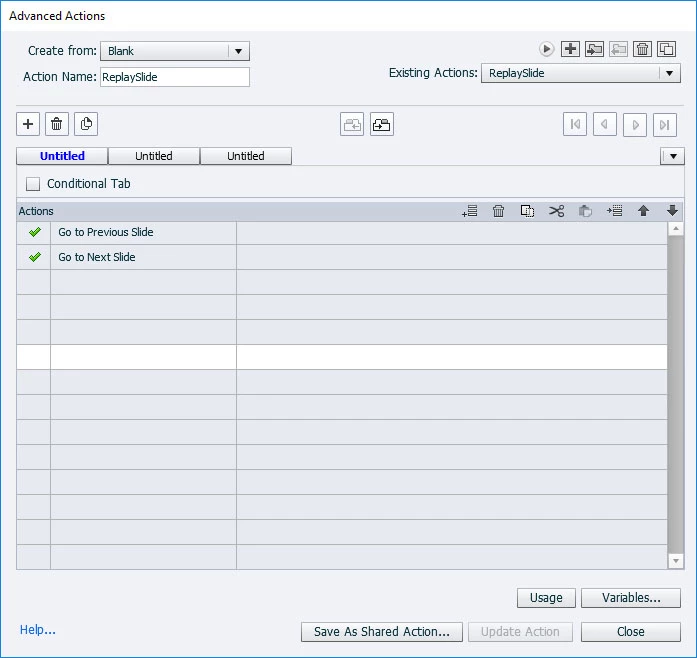
We have another group that use to publish projects in SWF format.  They've recently moved to CP2017 and are now publishing in HTML5.  They've used a replay button on some animation slides in their SWF version that isn't working in the HTML5 version.  I'm including the AA page.  I'm not very good at advanced actions but I'm not sure how this one would replay an animation.

Thanks in advance.

Susan
    This topic has been closed for replies.
    Correct answer Lilybiri

    Indeed, that type of actions can give problems with HTML5 output. An easy way, to achieve this is to create a short dummy slide before the slide to be replayed of 0,1secs. In that case the action will be functional because there is a small delay of 0,1sec before re-entering the slide. However that means that the total slide number will not be greater than what the learner sees. Micro-naivgation with a couple of frames alsow works.

    3 replies

    Lilybiri
    LilybiriCorrect answer
    Legend
    May 13, 2019

    Indeed, that type of actions can give problems with HTML5 output. An easy way, to achieve this is to create a short dummy slide before the slide to be replayed of 0,1secs. In that case the action will be functional because there is a small delay of 0,1sec before re-entering the slide. However that means that the total slide number will not be greater than what the learner sees. Micro-naivgation with a couple of frames alsow works.

    Gray Susan
    Inspiring
    May 13, 2019

    Looking at their projects I don't think they are numbering their slides.

    Lilybiri
    Legend
    May 13, 2019

    In that case, I have used that approach several times (with the dummy slides). You should be able to find it in several blog posts.