
July 28, 2011
Answered

CP5.5 - Is it possible to create a quiz summary screen with all questions reviewed on one screen?

  • July 28, 2011
  • 2 replies
  • 1076 views

Hello Forum members,

I was wondering if it is possible, rather than having a quiz review where you review the quiz questions one screen at a time, if it is possible to create a quiz summary screen, which will provide a summary of which questions were answered incorrectly/correctly (without actually giving the user the correct answers)?

An example of what I'd like to achieve is below:
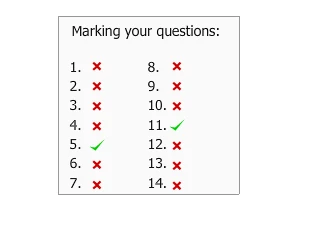
Is this possible in CP5.5? Perhaps with Advanced Actions/variables?

many thanks

Loraine

This topic has been closed for replies.
Correct answer

For information, Lilybiri has now supplied a more detailed explanation of how to achieve vishhere's idea above, which can be found at:

http://forums.adobe.com/message/3995154#3995154

many thanks,

Loraine

2 replies

Participating Frequently
July 28, 2011

Hello Loraine,

This is possible using Advanced Actions and variables. After every question, On Success you can set a variable to 1 and create a custom screen where you can show/hide the tick mark graphic based on the variable value set.

For Ex:

- For question 1, on success, set x=1

- On the results screen, correct tick mark graphic is hidden. If x=1, then show the correct tick mark.

Like this you can do for all the questions. Will wait for others also to comment for any quicker solution.

Thanks,

Vish

Correct answer
November 1, 2011

For information, Lilybiri has now supplied a more detailed explanation of how to achieve vishhere's idea above, which can be found at:

http://forums.adobe.com/message/3995154#3995154

many thanks,

Loraine

Steve Howard, ACP
Inspiring
July 28, 2011

I started building functionality like this in Captivate 4 by tracking scores

externally with JavaScript. Worked well. I'm not sure I would want to do the

same thing with advanced actions alone due to the labor-intensive nature of

AAA and the limitations in the scripting.

Steve