Inspiring
February 7, 2012
Question

Cp5 - Button properties panel

  • February 7, 2012
  • 1 reply
  • 525 views

Hi all

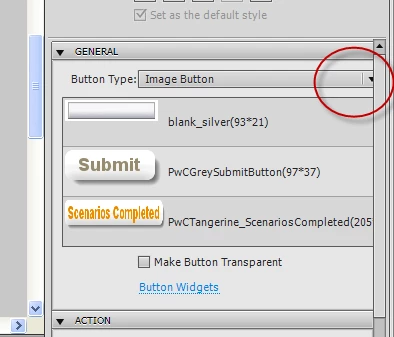
This is frustrating me so I'm hoping someone has some tips. When I copy a button from one project to another, I often want to change the button image. In the button properties, there is a little folder icon that lets me open my button gallery folder on the C: but it is only just accessible, and sometime, not visible at all (see image). To the right of the 'image button' combo box, I should see a folder, so I can quickly find the button image I need, but in this case it is not visible and there are no horizontal scroll bars at the bottom of the properties panel.

Has anyone had this issue and found a resolution or work around? Any help would be appreciated.

Regards

Amanda
    This topic has been closed for replies.

    1 reply

    RodWard
    Community Expert
    Community Expert
    February 7, 2012

    Yeah, this is a well-known usability bug that is caused by using very long names for your buttons.  The programmers in Adobe didn't think anyone would ever do that, so they didn't provide a way to scroll this panel.

    However, they DID provide a way to undock the panel and have it as a floating panel.  So in a pinch you should be able to just grab hold of the Properties tab and rip it off the panel so that you can get to this drop-down.

    In future, to avoid this issue, try to keep your button names short.

    Inspiring
    February 7, 2012

    Hi Rod

    Thanks for your reply. That makes sense and is good to know, however I have tried un-docking the panel but it does not stretch horizontally either

    Maybe I'll try moving my button files around and see if it helps, thanks again.

    Regards

    Amanda

    RodWard
    Community Expert
    Community Expert
    February 7, 2012

    OK.  Well in that case your best recourse might be to copy the files for your buttons in the Gallery and rename them to have much shorter names.  I don't think moving the buttons around is going to fix the issue.  And (from memory) renaming the existing buttons doesn't do the trick either.  Captivate sets the width of this area by the name of the longest button in the Gallery.  But for some reason, even if you remove or rename those buttons so that they are all short-named again, Captivate seems to think they are still there.  It retains settings somewhere about this.  You may even need to delete your Preferences file to reset everything.