Inspiring
December 13, 2013
Question

[Cp6] Fonts are not displayed "real size"

  • December 13, 2013
  • 1 reply
  • 719 views

Hello,

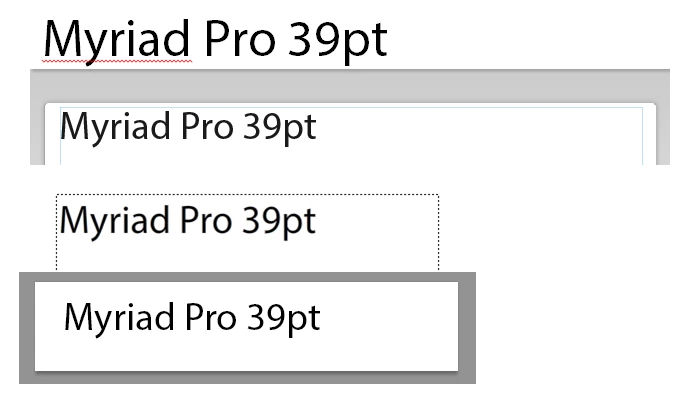
We're trying to get a consistant look of our productions through various software used and we just discovered that Captivate fonts are displayed smaller than in Word or software from the competition.

I fear this has something to do with the screen "DPI" the software estimates (72dpi or 96dpi).

Here you can see the result in Word, Captivate, Flash and Photoshop :
Any advice or tip about this ?

Thanks.

PJ

This topic has been closed for replies.

1 reply

Lilybiri
Legend
December 13, 2013

It is pretty consistent for Adobe applications, right? Word is normally meant for print, they don't care a lot about screen exactitude IMO. Are you aware of the fact that even Powerpoint, which is meant for presentations on a screen, has no clear settings for resolution? The size is set in cm or in which is crazy for an application that is meant for screen output. But will stop ranting about MS.

How was the 'magnification' of the screenshots set? That is easy in Flash, Photoshop and Captivate, but in Word?

pjgfiAuthor
Inspiring
December 16, 2013

Thanks for your answer.

All screenshots were made at 100% in each application (and yes, the Adobe suite is consistent).

Word is actually pretty accurate, my printed sheet will perfectly match what's on the screen (see through).

I know it sound weird talking about cms for screen output but as fonts are set in points, that's a link to a universal measure, not to a relative pixel size (screens pixel density).

I'll have another look in the Adobe suite...

Lilybiri
Legend
December 16, 2013

Sorry, must not have been clear. The meaning of 100% is totally different in MS and Adobe. In Word it means real print size. In Adobe applications 100% means that one pixel on the screen is one pixel of the 'image' and that is something totally different. To me the Adobe approach is much more logical if you are getting out of a pure printing environment, but I'm using a lot of Adobe applications. As I told you, the cm/in approach of an application like Powerpoint has no sense IMO and will even need some calculations if trying to find the proper resolution for showing the presentation depending on the projector functionality. For Word, in the sense of being meant for print, 100% meaning real size when printing can seem logical, but what if you are writing a text that is not meant to be printed?

Lilybiri