Cp6: Quiz 'Accuracy' not being saved if user goes 'back' over previously completed quiz slides
I would appreciate finding out how to solve the following issues (my LMS Administrator has indicated it is a Design issue, after 'relaxing' LMS settings in SkillSoft LMS)
I am using Captivate 6, course is being published to SkillSoft LMS.
Problem:
User completes course (includes 4 quiz sllides), gets to last slide (results page confirming all questions completed & 100% accuracy). However, if the user then goes back within the course (using Playbar) and continues to go back over past quiz slides completed (eg 2 Quiz Slides) and then exits course 'INCORRECTLY' (ie not from last slide and by clicking on 'x' on top right of browser screen). Then goes back into course (ie will open at point user exited) and goes to last slide, the system will show Accuracy 50% (ie 'wiped' the results of the quiz slides user went back over). The course also includes 2 branched slides, but they are not associated with any quiz slides and come before quiz slides.
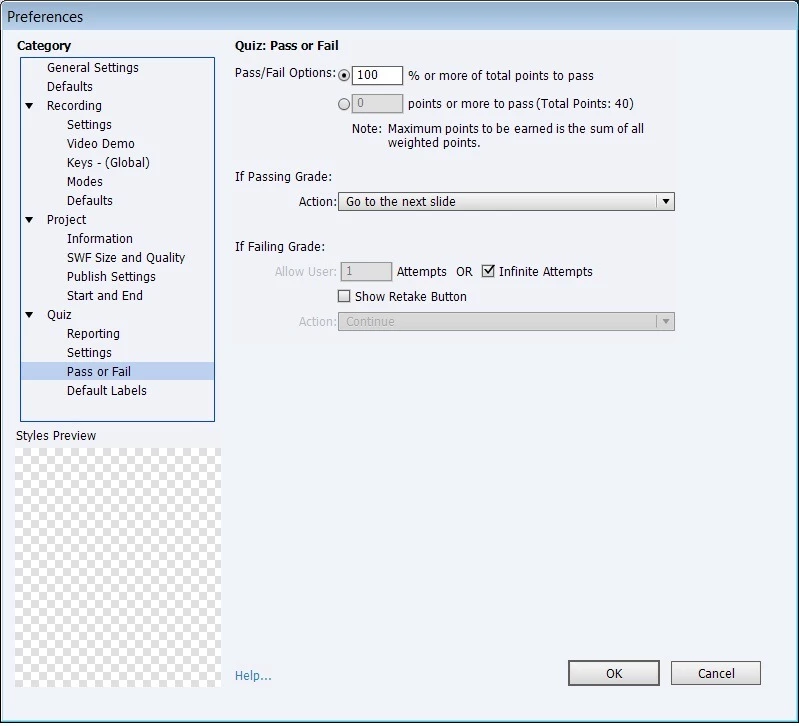
Settings: Preferences (Quiz Settings)
- Enabled Allow Backward Movement
- 100% accuracy required, ie Pass each quiz slide to progress. Project has 4 multiple choise quiz slides
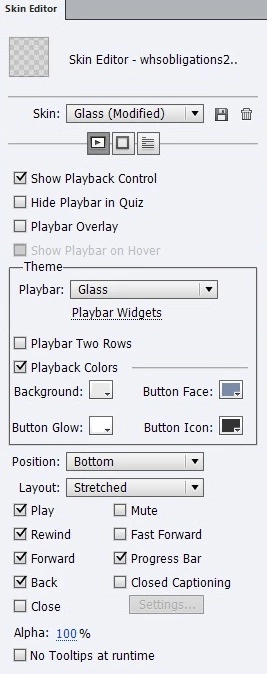
- Playbar displayed on all slides
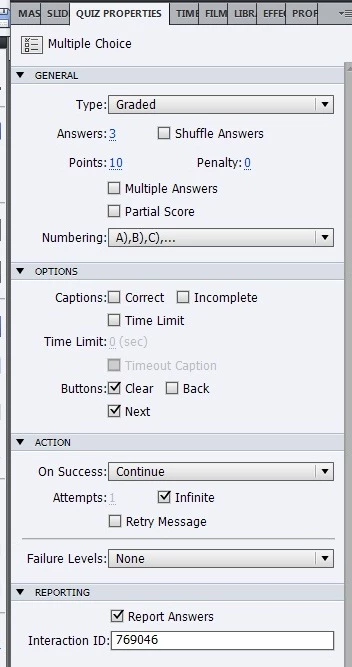
Quiz Properties:
- Did not use BACK button on Quiz slides, only 'Clear', 'Submit' and 'Next. (Note: I just saw on my Quiz Slide 2, I have incorrectly added a ‘BACK’ button instead of a ‘CLEAR’ button back, but don't think was the cause of the problem)
Thankyou
Sharon
Message was edited by: Sharon_24
 AdChoices