Known Participant
November 12, 2013
Question

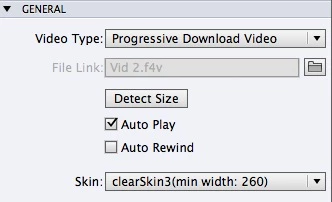
Cp7 Video Object "File Link" greyed out. Can't open File chooser.

  • November 12, 2013
  • 1 reply
  • 546 views

Hi There! I can't change the path to my videos with Captivate 7, it works with Captivate 6, but it's a pain to go back and forth between programs. Has anyone else experienced this bug? It's a video that is NOT located in the module, it sits in the folder and is loaded into the module from the outside, keeping file size down. I've attached a screenshot to illustrate my issue. The folder icon on the right is not clickable in Cp7, and it IS clickable and works in Cp6.

Thanks!

Kev
    This topic has been closed for replies.

    1 reply

    RodWard
    Community Expert
    Community Expert
    November 13, 2013

    Try resetting your Workspace, and if that doesn't work, reset your Preferences folder.

    See item #8 on this troubleshooting list:

    http://www.infosemantics.com.au/adobe-captivate-troubleshooting/basic-troubleshooting-techniques

    One more suggestion I have for you.  I notice from your screenshot that your video file name has upper and lower case letters as well as a space in the middle.  Both of these things could come back to bite you by causing your video to potentially not work.  Use only lower case filenames and no spaces.

    If you want 300 more troubleshooting tips for Cp, you'll need to read the book:

    http://www.infosemantics.com.au/troubleshoot-adobe-captivate

    Known Participant
    November 20, 2013

    Hi Rod, thanks for your response! I've been away on other projects and I'm just getting back to this now. I've tried everything that you suggested and I still cannot update the video file with Cp7. I can do it in Cp6, but not Cp7. The folder button is still unresponsive in Cp7.

    Has anyone else seen this issue?

    Known Participant
    December 17, 2013

    Had to bump this again. Now that I'm on Mavericks, I can't go back to Captivate 6 to make te videos work. Any help would be very much appreciated.