
tandate
Participant
July 1, 2015
Question

cp8 publishing HTML5 for ipad

  • July 1, 2015
  • 1 reply
  • 416 views

I work in a training and development team and have created some eLearning projects, which I have published as SWF. I am now attempting to publish them in SWF / HTML5 as we have a number of users who use iPads but it isn't working.

Can anyone advise how to publish a cp8 project to work on iPad.

I have selected the option to publish as SWF / HTML5, which provides me with the following output:
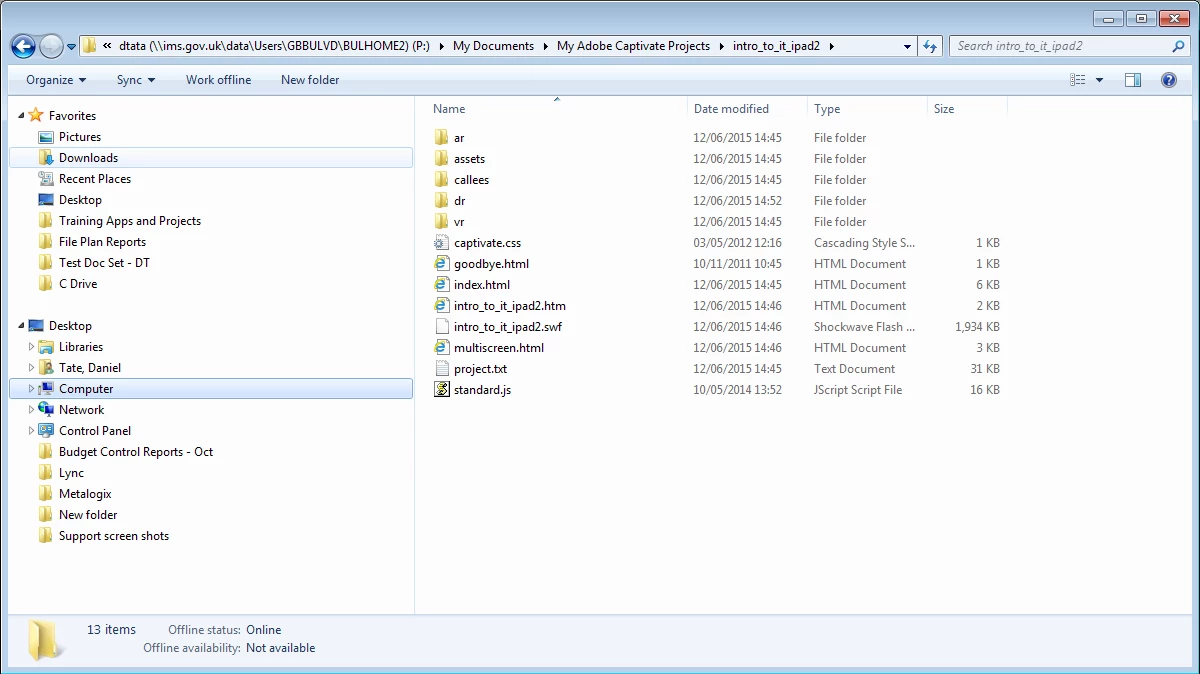
The only difference I can see when publishing as HTML5 rather than SWF is that I get the goodbye.html and multiscreen.html files.

What am I missing?

Thanks in advance.

    This topic has been closed for replies.

    1 reply

    TLCMediaDesign
    Inspiring
    July 1, 2015

    That is exactly what you should be getting. You also get all of the folders, which you don't when publishing to swf only. That is where the HTML5 files are.

    tandate
    tandateAuthor
    Participant
    July 1, 2015

    Thanks for the quick response.

    So which file do run to launch it on iPad?

    You might be able to tell that I'm new to Captivate with no training!

    Thanks

    Dan

    TLCMediaDesign
    Inspiring
    July 1, 2015

    The multiscreen is the file that determines if you are viewing mobile or not and loads the applicable file..

    index.html is the HTML5 file

    Your_Project_Name.html is the SWF version