


rynotrain
Known Participant
Sep 17, 2015 4:58 PM UTC
Question

Cp8 Responsive - Publish for Devices

Hi Cp Community!

Need some quick direction.  I'm publishing my first responsive project for devices.  On the publish menu my options are to Publish for Devices or Publish to Adobe Connect (no other options).  Once I click Publish for Devices, the Publish dialog box displays as show below.  It's missing the drop down for Publish To: so that I can choose Windows 8 or PhoneGap, etc.  What am I missing here?
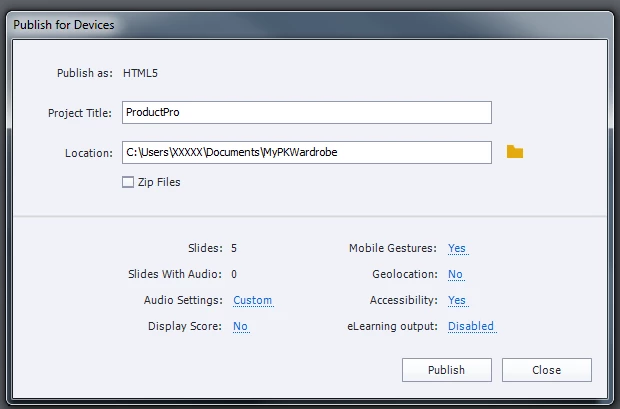
Thanks for your help!

Ryan

    This topic is closed to new replies. Start a new post to keep the conversation going.

    14 replies

    Lilybiri
    Legend
    Sep 17, 2015 5:14 PM UTC

    You can only publish to html5, for that reason a choice has no sense.

    Translate
    Captiv8r
    Legend
    Sep 17, 2015 6:09 PM UTC

    To expound on what Lilybiri said: With Responsive output, it is intended to work on any device and simply "RESPOND" and show only the content that would fit for the device settings. Because of this, it is device and operating system independent. Thus no need for choosing to optimize for specific operating systems.

    How well it will actually do that remains to be seen.

    Cheers... Rick

    Translate
    rynotrain
    rynotrainAuthor
    Known Participant
    Sep 17, 2015 7:05 PM UTC

    Thanks Lilybiri & Captiv8r!  I was reading the Cp8 User Guide which indicated I could go straight to PhoneGap Build.  I guess not.  Can either of you guide me to what I need to do to get my HTML published content to Phone Gap?

    Ryan

    Translate