iasmif91407090
Known Participant
May 31, 2016
Answered

Cp9: Fill and Stroke panels disappeared

  • May 31, 2016
  • 2 replies
  • 1082 views

Hi all,

thank you in advance for your help.

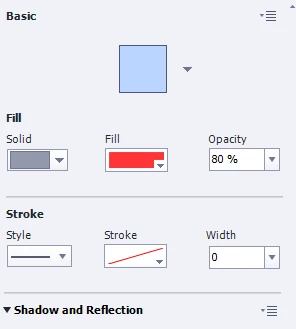
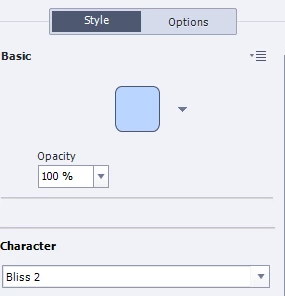
I was editing today the colour of some smart shapes and I cannot understand why but after a while the Fill and Stroke panels disappeared from the Properties panel. As a result, I cannot change the fill colour and stroke colour/weight of my shapes. The only thing that I can change is the transparency.

            Screenshot without the Fill and Stroke panels                   Screenshot with the Fill and Stroke panels 
                          

Do you possibly know what have gone wrong?


Kind regards

This topic has been closed for replies.
Correct answer Lilybiri

I never use a networked drive, but had the same problems once in a while. Clearing Preferences, last possibility is always tough, because you lose all customisation (you can recover some items, but not everything). There is no mystery in it: in the subfolder Utils of the Captivate installation folder you can use a batch file to clear the Preferences. To keep customisation:

http://blog.lilybiri.com/cativate-8-dot-0-1-install-keep-your-customisation

2 replies

Lilybiri
Legend
May 31, 2016

It happens often, not only when cache is filled. Only with shapes apparently, I logged a bug report. Mostly Restarting Captivate will fix it, you can try to reset the Workspace, but that is not often working.

iasmif91407090
Known Participant
May 31, 2016

Hi Rod and Lilybiri,

thank you a lot for your replies Lilybiri that's true I've restarted my Captivate and updated the Workspace but nothing.

I've contacted Adobe Support and they reset my Captivate preferences. I don't remember what they've done exactly but they went in my Adobe Captivate 9 folder (in the C: Drive) and they've updated some files. When I opened again Captivate the problem was resolved.

The Adobe agent told me that the problem was probably caused from the fact that I save my Captivate projects in a Network Drive and not in a Local Drive.

From now on I will save my files in my local drive and let's hope that this problem won't appear again.

Therefore, whoever is facing the same issue, I would recommend contacting Adobe Support to resolve that issue. They are very quick and helpful.

Thank you Rod and Lilybiri for your support.

Lilybiri
LilybiriCorrect answer
Legend
May 31, 2016

I never use a networked drive, but had the same problems once in a while. Clearing Preferences, last possibility is always tough, because you lose all customisation (you can recover some items, but not everything). There is no mystery in it: in the subfolder Utils of the Captivate installation folder you can use a batch file to clear the Preferences. To keep customisation:

http://blog.lilybiri.com/cativate-8-dot-0-1-install-keep-your-customisation

RodWard
Community Expert
Community Expert
May 31, 2016

How long since you cleared your project cache?