Participating Frequently
January 13, 2016
Answered

CP9: First failure caption does not show up

  • January 13, 2016
  • 1 reply
  • 324 views

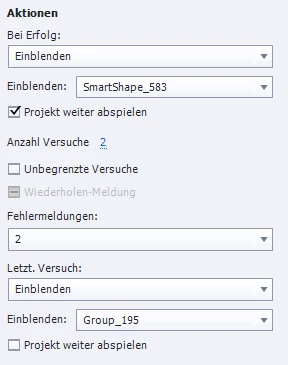
I have a question slide (the new type NOT the classic quiz slide) with two attempts. The first failure caption does not show up after klicking the evaluate button. After the second attempt the failure caption shows up the same way as usual. Both captions are visible in edit mode. Please also see the settings below:

    This topic has been closed for replies.
    Correct answer Lilybiri

    Are you talking about the Knowledge Check slides? Sorry, but text in an image cannot be translated by Jive: Einblenden is that 'Show'? Are you using the embedded Failure captions? I just double-checked in 9.0.0.230:

    • I created a Knowledge Check Slide
    • I changed attempts to 2 and Failure message to 2 (default is None)
    • I had two failure messages on the slide, and changed the text of the first message
    • I tested and the first message popped up when my first attempt was incorrect

    You have to be as careful with knowledge check slides as with the normal question slides: do not delete embedded objects (those without a separate timeline). I see that you apply simple actions for Success and After Last attempt. The action After Last Attempt will not be executed when the first attempt is unsuccessful.

    You can have my answer translated using the Translate button at the bottom right. Although I understand some German, don't dare to write in German.

    1 reply

    Lilybiri
    LilybiriCorrect answer
    Legend
    January 13, 2016

    Are you talking about the Knowledge Check slides? Sorry, but text in an image cannot be translated by Jive: Einblenden is that 'Show'? Are you using the embedded Failure captions? I just double-checked in 9.0.0.230:

    • I created a Knowledge Check Slide
    • I changed attempts to 2 and Failure message to 2 (default is None)
    • I had two failure messages on the slide, and changed the text of the first message
    • I tested and the first message popped up when my first attempt was incorrect

    You have to be as careful with knowledge check slides as with the normal question slides: do not delete embedded objects (those without a separate timeline). I see that you apply simple actions for Success and After Last attempt. The action After Last Attempt will not be executed when the first attempt is unsuccessful.

    You can have my answer translated using the Translate button at the bottom right. Although I understand some German, don't dare to write in German.

    Participating Frequently
    January 13, 2016

    Thank you for your answer. I deleted the embedded "try again" caption, i think this was my mistake.

    Lilybiri
    Legend
    January 13, 2016

    You can uncheck the Hint caption, and normally it will never show up when you limit the number of attempts AND activate to have multiple Failure messages.

    You checked '2 Failure Message' and should see two Failure captions or shapes that you can edit. But they are exactly in the same location on the Knowledge Check slide, you'll have to drag them to see the second caption.