Cp9/HTML5 font, line-break and design issue with FIB
I´ve encountered some weird stuff I do not understand with my fill-in-the-blank quiz slides when I publish two projects - one as responsive project, the other one as a fixed size project - both in HTML5:
- The select boxes look different in two projects (see images below): No. 1 responsive project with round corners in IE (which are smaller than in Firefix), No.2 with sharp corners in IE and Firefox.
- The small arrow at the dropdown menu is different, although I did not change this one either: No. 1 in IE with this big ugly rectangle button, No.2 in Firefox and IE with nice small blue arrow - I´d like to keep that small blue one in every project 😉
- The font styles are different not only between these two projects but also between browsers. Both projects are set with Arial in all cases, but as seen in picture No.1 the IE shows the selection option in Arial but the selected item in Times, whereas with the other project IE shows Arial correctly for selection options as well as selected items.
- Font sizes seem to be different between text and drop down menu (Picture No. 1)
- Stacking problem with the fixed sized project (see picture No.2): If the user wants to change his selection, the dropdown menu is BEHIND all other stuff. This only happens with a fixed size project, not with a responsive project.
Picture 1: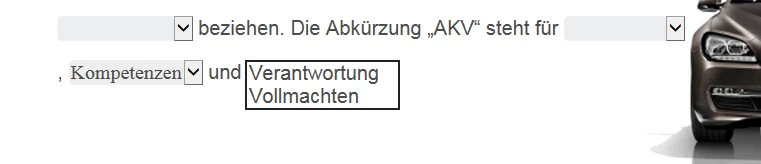
Picture 2:
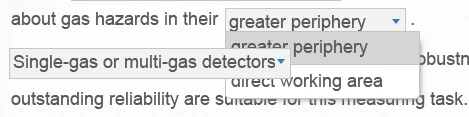
I´ve tried to investigate in the published CSS and CPM.js files (and all other), but unfortunately did not find the right spot do do any adjustments. How does it happen that there are such big differents betwenn a responsive HTML5 and a fixed size HTML5? As we do publish for ONE customer both in responsive and in fixed size projects we do need the same look and feel throughout all projects (even if crossbrowser is not possible).
I`d like to know where to grab into css or whatever, preferably with template files to avoid adjusting everytime after publishing. Does anyone have a clue or a hint for me? That would be great 🙂
I´m Working with Captivate 9 (latest version), Win7, published as HTML5, all samples shown here based on the standard design theme.
 AdChoices