
Inspiring
September 29, 2015
Answered

CP9: Import SVG - Spanish characters not displaying correctly

  • September 29, 2015
  • 1 reply
  • 762 views

Hi I'm importing an Inkscape SVG file into a responsive project. The SVG has Spanish text characters in it i.e. ó, ñ - these do not display correctly in Captivate 9. I viewed the SVG in IE11 and Chrome and it displays correctly. In captivate i imported using both Media > SVG, and Import > library - both don't display correctly (i.e. in the library also). So i'm assuming the issue is with Captivate? Regards Donal.

This topic has been closed for replies.
Correct answer donalall

Hi Mohana,

I have just emailed it to you.

Regards

Donal.


Update (after speaking to Adobe):

ISSUE: Spanish special characters not displaying correctly in SVG file that contains text

Here is how "úñ" is displayed:

Responsive projects:

Characters display incorrectly on stage/timeline/edit area but display correctly in Preview and Publish.

Non-responsive:

SWF - not supported - display incorrectly onstage, on preview, and when published.

HTML5 output - same as responsive projects.

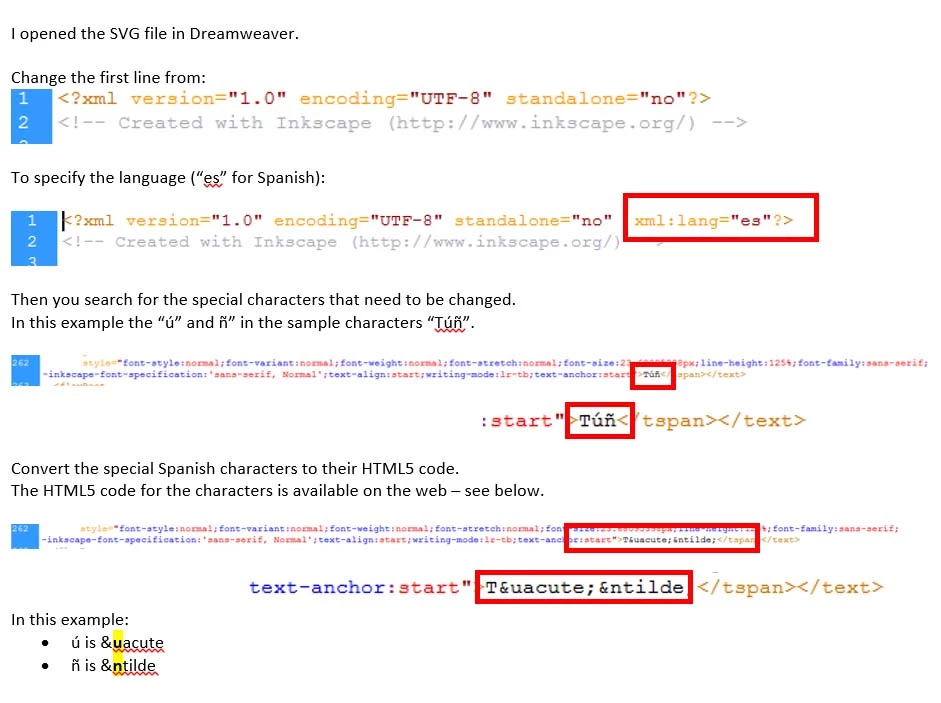
SOLUTION:

You need to hard code the characters in the SVG file.


The HTML5 code for Spanish character is included in the “ISO-8859-1 Characters” section in the link below.

http://www.w3schools.com/charsets/ref_html_8859.asp

Regards

Donal.

1 reply

donalallAuthor
Inspiring
September 29, 2015

Hi

I'm importing an Inkscape SVG file into a responsive project.

The SVG has Spanish text characters in it i.e. ó, ñ - these do not display correctly in Captivate 9.

I viewed the SVG in IE11 and Chrome and it displays correctly.

In captivate i imported using both Media > SVG, and Import > library - both don't display correctly (i.e. in the library also).

So i'm assuming the issue is with Captivate?

Regards

Donal.

mohanadas
Adobe Employee
Adobe Employee
September 30, 2015

Hey Donal,

Could you share the sample SVG?

Thanks,

Mohana

donalallAuthor
Inspiring
September 30, 2015

Hi Mohana,

I have just emailed it to you.

Regards

Donal.