
Participating Frequently
August 17, 2016
Answered

CP9 KC Slides - Can't add button

  • August 17, 2016
  • 1 reply
  • 273 views

All of a sudden, I can't add a button to a Knowledge Check slide. Yesterday I was doing so, but can't today.

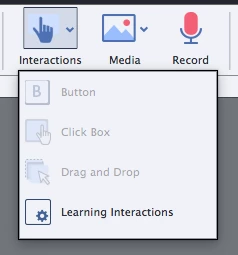
When I click on the "Interactions" icon, the first three items (Button, Click Box, Drag and Drop) are all grayed out. Only "Learning Interaction" is available.

My typical workaround is, create the item in another page and then Copy/Paste it. But this page will not even let me paste anything.

Already tried restarting computer and Captivate.

Anyone else have this problem?
Thanks in advance,

Dan

Plano, TX

This topic has been closed for replies.
Correct answer Captiv8r

Hi there

To the best of my knowledge, a KC slide is nothing more than a typical Question slide save for the configuration of scoring or whatever. And Captivate has never allowed adding things like buttons to these kinds of slides.

Is it possible that you are mistaken about the ability to add a button to one earlier? if you were, that would be kind of a bug.

Cheers... Rick

1 reply

Captiv8r
Captiv8rCorrect answer
Legend
August 17, 2016

Hi there

To the best of my knowledge, a KC slide is nothing more than a typical Question slide save for the configuration of scoring or whatever. And Captivate has never allowed adding things like buttons to these kinds of slides.

Is it possible that you are mistaken about the ability to add a button to one earlier? if you were, that would be kind of a bug.

Cheers... Rick

danpatleeAuthor
Participating Frequently
August 17, 2016

Well, Rick you are right. I realize that what I did before was not add or create a button; I simply checked the "Skip" button to create it, and then edited it.

Thanks for your kind answer to a dumb question.

Dan