iasmif91407090
Known Participant
June 6, 2016
Answered

Cp9: Overlapping Drag items

  • June 6, 2016
  • 2 replies
  • 656 views

Hi there,

apologies if you already answered a similar question in the forum, but I couldn't find so far a similar discussion.

I've created the following drag and drop activity:
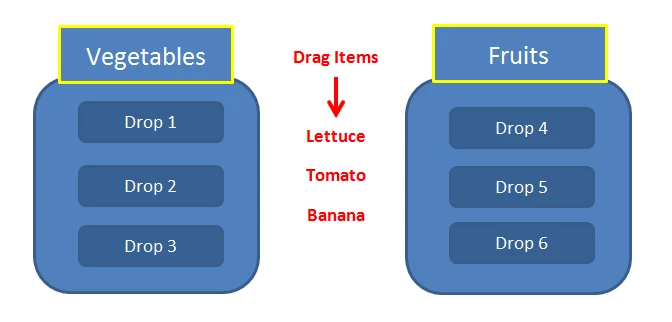
The challenge that I am facing is that I cannot restrict/disable the user from dropping a Drag item (e.g. Lettuce) on a Drop area (e.g. Drop 1) that already has Drag item (e.g. Tomato) on it. As a result, I end up having 2 Drag items on one Drop area.

What I want to happen is: the Drop area to accept only one Drag item irrespective of whether the Drag item is correct or wrong.

Any ideas?

Thank you in advance,
Iasmi
This topic has been closed for replies.
Correct answer TLCMediaDesign

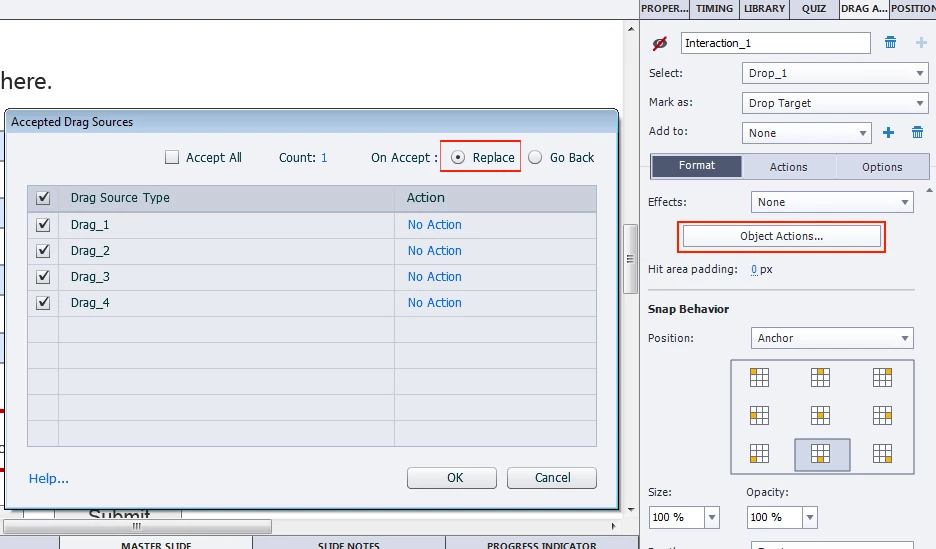
Select the Drag and Drop Tab. The select a drop object. Click on the Object Actions button. Deselect Accept All and select On Accept: Replace.

2 replies

Lilybiri
Legend
June 6, 2016
iasmif91407090
Known Participant
June 6, 2016

Thank you Lilybiri for the extra help

TLCMediaDesign
TLCMediaDesignCorrect answer
Inspiring
June 6, 2016

Select the Drag and Drop Tab. The select a drop object. Click on the Object Actions button. Deselect Accept All and select On Accept: Replace.

iasmif91407090
Known Participant
June 6, 2016

Thank you a lot TLC Media Design for the prompt response.

It now works -  However, for the needs of my project I will select the Go Back option.

Thank you once again, I really appreciate your help.

Kind regards,
Iasmi