

Question
CP9 Review questions mode - how to change font type and size?
Hi,
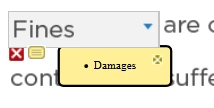
I have been wondering how to edit the small yellow text box which appears in questions review mode (when answered wrong).
Case:
If user has answered wrong for a fill in the blank question; while reviewing it, user finds a small yellow color sticky icon besides cross mark. When user clicks that icon, right answer is displayed in a text box. I am unable to edit font type and size inside that yellow box. If I could change settings of that yellow box to make it beautiful by changing size, color and anything else, it will be good.
In the attached image, the question font is similar to Arial and the right answer displayed in yellow box is I think Times. Need to maintain consistency and change the font type.
Experts, please help.
 AdChoices