
Inspiring
September 12, 2015
Answered

CP9: Text Entry box: Focus Lost displayed when Submit clicked

  • September 12, 2015
  • 1 reply
  • 515 views

Hi

I seem to be having issues with my text entry boxes (TEBs).

These issues appear sometimes not all the time.

The latest one being that when i click the Submit button the Focus Lost text caption is displayed.

I came across the issue when working on a project so i decided to 3 slides project to test it.

1 TEB onscreen.

  • Success goes to next slide.
  • Failure shows inbuilt failure caption.
  • Focus Lost shows a text caption.

Slides hides Focus Lost text caption on entry.

No advanced actions.

Timeline just shows TEB and text caption for Focus Lost.
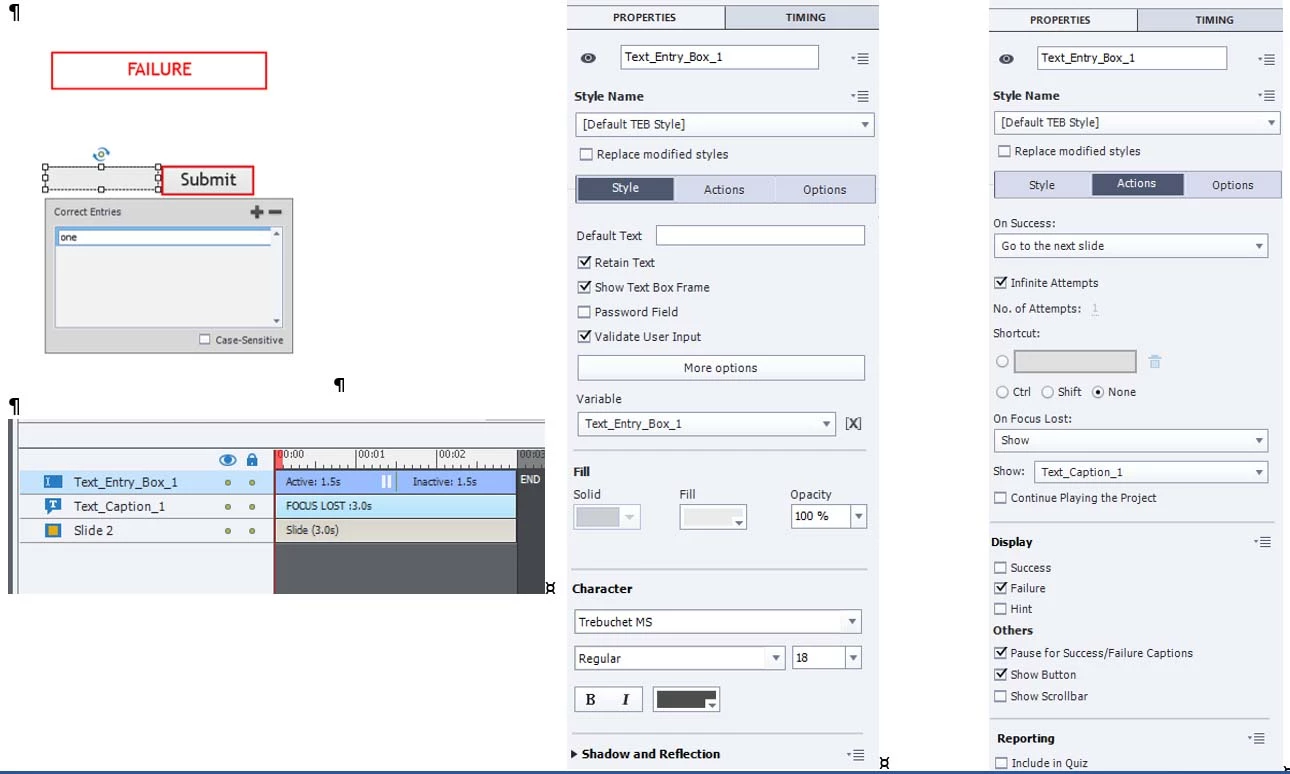
CP9, nonresponsive project ( a new project - just 3 slides), previewing project & previewing in browser. have no published yet.

I have deleted slide and added a new slide.

I cleared cache and reset preferences.

Regards

Donal.

    This topic has been closed for replies.
    Correct answer RodWard

    From the way you have described the setup, and the screenshots, it looks to be behaving exactly as it should.

    I would have expected the Text Caption to SHOW every time you clicked the Submit button.

    The On Focus Lost event should fire when your cursor has been placed in the text field of the TEB and then you move it outside of that field and click anything at all, which would of course include clicking the Submit button of the TEB itself.

    So far I'm not seeing any bug or issue here.  Can you describe what you think SHOULD be happening?

    1 reply

    RodWard
    Community Expert
    RodWardCommunity ExpertCorrect answer
    Community Expert
    September 12, 2015

    From the way you have described the setup, and the screenshots, it looks to be behaving exactly as it should.

    I would have expected the Text Caption to SHOW every time you clicked the Submit button.

    The On Focus Lost event should fire when your cursor has been placed in the text field of the TEB and then you move it outside of that field and click anything at all, which would of course include clicking the Submit button of the TEB itself.

    So far I'm not seeing any bug or issue here.  Can you describe what you think SHOULD be happening?

    donalallAuthor
    Inspiring
    September 13, 2015

    Hi Rod,

    Here is what I thought should be happening:

    1. Type incorrect answer - click Submit - inbuilt failure caption shows.
    2. Type incorrect answer / some text - don't click Submit, but click somewhere else - Focus Lost associated text caption displays - "You must click Submit".

    I must have the wrong understanding of "On Focus Lost".

    I thought it was click outside TEB - excluding the Submit button.

    So Focus Lost is used when Submit button is not used?

    What I want is to display error text captions when user:

    •    Enters nothing and clicks elsewhere (doesn’t click the submit button)

    •    Enters some text and clicks elsewhere (doesn’t click the submit button)

    (i know that this is unlikely but want to cover the options)

    How would I achieve this?

    I tried removing On Focus Lost and including a click box that covered screen.

    But I ran into this issue:

    • Published (SWF, HTML) - when I type text in TEB, then highlight it (to delete it), when I release the mouse the click box caption displays.
    • This does not occur in Preview mode

    Also you mentioned that

    “The On Focus Lost event should fire when your cursor has been placed in the text field of the TEB and then you move it outside of that field and click anything at all”.

    But the cursor in the TEB by default i.e. i can just type without having to click in the TEB first?

    Donal.

    RodWard
    Community Expert
    Community Expert
    September 13, 2015

    As you say, if you've set up the order correctly, then the cursor would be automatically placed inside the TEB field when you enter the slide.

    When you enter something into the text field and click anywhere outside it (including clicking the Submit button) then you trigger the On Focus Lost event.  If your click happened to be on the Submit button then you would in fact be triggering two events.  On Focus Lost and a possible On Success event.  (Although an incorrect answer triggers the appearance of the Failure caption, it does not in fact trigger the On Last Attempt action in your case because you have Unlimited Attempts set.)

    After testing  a little, I found that if the cursor is in the TEB field, but you have typed nothing, and then you click outside the TEB anywhere, this DOES NOT trigger the On Focus Lost event.  It only fires AFTER you have typed something in the field and then clicked outside the field.  So. the ON Focus Lost event is probably less useful than it might at first seem.

    Each TEB has an associated variable, which would initially contain no value.  If what you're really trying to achieve here is test for the user NOT entering anything into the TEB, then you can do this via the Validation.  Entering nothing in the field would be marked incorrect.  Alternatively, you could set up more sophisticated validation using either Conditonal Advanced Actions or even JavaScript with Regular Expressions (if you're a programmer).