
TRob573
Participating Frequently
May 8, 2017
Question

.cptx file will not open

  • May 8, 2017
  • 4 replies
  • 1103 views

I saved a file in Captivate 9 on Friday afternoon on the company network before I left.  I was able to publish it and everything seemed fine.  Unfortunately I noticed a typo and wanted to jump back in to correct it and I am getting this error.
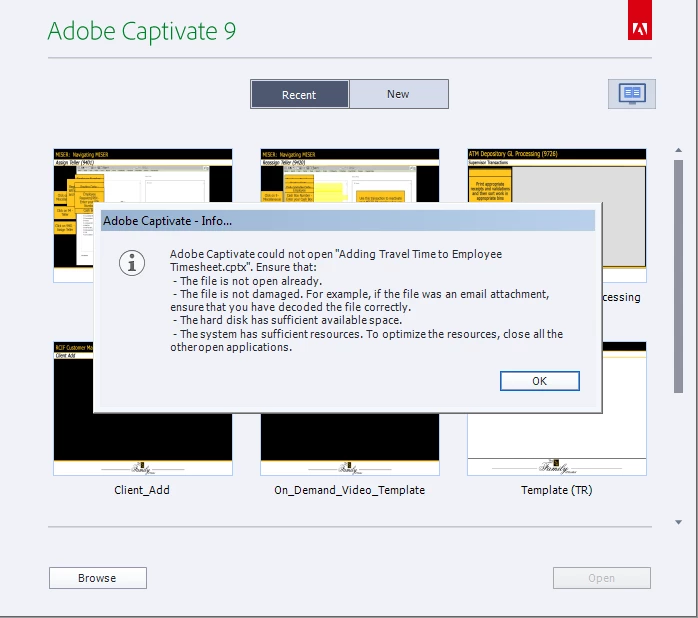
I have rebooted, renamed and tried to open it from other computers with no success.  I even tried to restore it to a previous version but it won't open.  Can somebody please help me?  I am freaking out.  This is a significant amount of work to lose.

    This topic has been closed for replies.

    4 replies

    TRob573
    TRob573Author
    Participating Frequently
    May 9, 2017

    Unfortunately nothing worked.  I spent all day recreating the file.  I have set my preferences to create a backup from now on!  Thank you anyway everyone!

    Participant
    May 9, 2017

    If you don't have a backup of the file, try following the procedure outlined for Captivate 8 in the link below. That should allow you to generate a working .cptx file again.

    http://www.cpguru.com/recovering-corrupt-adobe-captivate-projects/

    Good luck!

    BDuckWorks
    Inspiring
    May 9, 2017

    Did you have backups turned on?


    It's a preference, but it should be a requirement, when the primary file is saved it will save a duplicate with the .bak extension added.


    Since it was a networked drive, do you have an IT support group? Do they run backups? Ask if they can restore the file back to a version saved after the Friday work session. It may be possible that an archived backup was made before corruption occurred, so give them a call.

    Lilybiri
    Legend
    May 8, 2017

    Is that file stored on a networked drive? Did you  try to copy it to your system and open it? Captivate doesn't like to work on a networked drive. You can also check if there are no files left with lck (lock) extension?