



Question
Create an Advanced action with TWO decisions (tabs)
I want to stop the state changes at the last state and have the Next button appear only at that moment, the advanced action will need to be a little bit more complicated. I have done the following:
- Create a user variable v_counter (Project, Variables); it can have a default value of 0.
- Check that the Timeline of the Next button starts after the pausing point of Button_1 (as is the case now)
- Re-add a pausing point to the Next button (Timing properties, Pause after 1.5secs is OK)
- Extend the timeline of the Next button till the end of the slide (CTRL-E or with Timing properties.) If you do not have slide audio, the slide duration can be reduced, you don't need such a long slide.
- Shorten the duration of the Button_1 timeline so that it ends before the pausing point of the Next button
But I need some assistance in doing the last part:
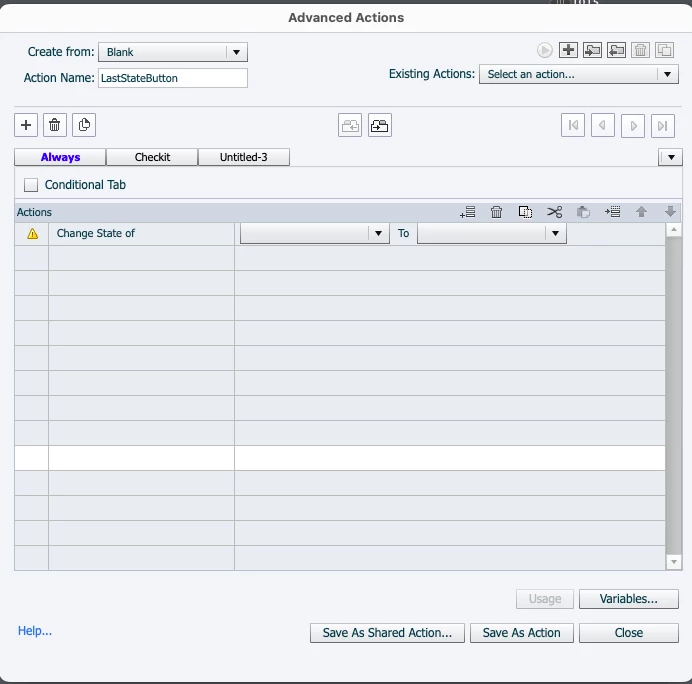
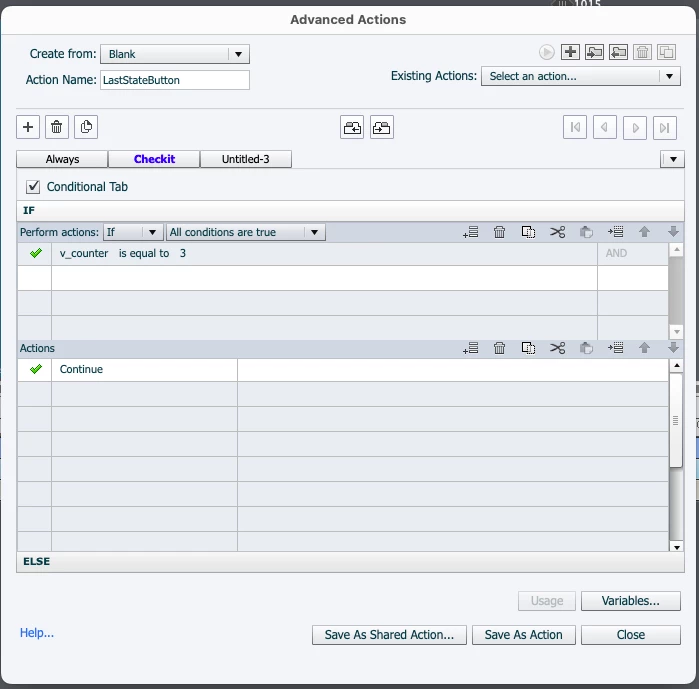
Create an Advanced action with TWO decisions (tabs):
Decision 1 'Always'
Change state....
Increment v_counter by 1
Decision 2 'Checkit' is conditional!
IF v_counter is equal to 3
Continue
I am attaching the two different Advanced Action tabs below. I do not know how to get the Decision "Always" to work.
Thank you in advance.
 AdChoices