
Participant
April 15, 2019
Answered

Create Quiz that is a Fillable Form

  • April 15, 2019
  • 1 reply
  • 551 views

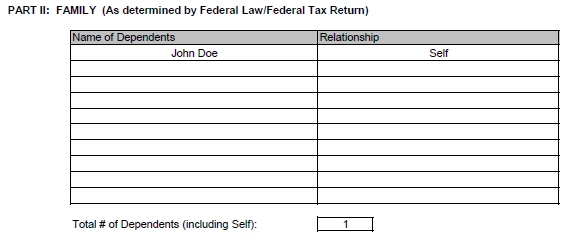
I am trying to create a quiz that allows users to enter data on a sample form.  I have tried using Fill in the Blank and Short Answer quiz slides, tried modifying the quiz master slides, and am having no luck.  A screenshot of the sample form is below.  I want users to be able to enter the dependent names and relationships, and then the total number of dependents, based on a scenario they are provided.  There would be individual textboxes/fill in fields for each area (max 2 under each column and then 1 for number of dependents).  Is this something that is even possible in Captivate?  I am using Captivate 2019.  Thanks in advance!
    This topic has been closed for replies.
    Correct answer Lilybiri

    Do you need to have these entries graded? Use Text Entry Boxes, which can be scored in dividually. Not only quiz slides can have scores but all interactive objects. Turn on Reporting in their Properties panel and fill in a score (is set to 1 by default).

    Advanced interaction panel (F9) shows you perfectly what is scored, what is added to the total score to be reported.

    1 reply

    Lilybiri
    LilybiriCorrect answer
    Legend
    April 15, 2019

    Do you need to have these entries graded? Use Text Entry Boxes, which can be scored in dividually. Not only quiz slides can have scores but all interactive objects. Turn on Reporting in their Properties panel and fill in a score (is set to 1 by default).

    Advanced interaction panel (F9) shows you perfectly what is scored, what is added to the total score to be reported.

    Participant
    April 15, 2019

    Thanks!  That should do exactly what I was looking for!  I appreciate your response!

    Lilybiri
    Legend
    April 15, 2019

    You're welcome and success!