
Participant
July 19, 2016
Question

Creating an assessment button after lessons are complete

  • July 19, 2016
  • 1 reply
  • 226 views

I am working in Captivate 8 to create a course that has 5 lessons, which can be taken in any order. After completing all 5, I want to create an active assessment button that will take the learner to the assessment portion. I have seen creations where modules are created but I am using pictures that have variables on it and actions that change it from a color pic to a gray and check mark when it is done. My screenshot shows the pics before you complete, after they complete a gray version of it appears with a green check mark. On the bottom is the assessment button that I want to appear after all 5 are finished.
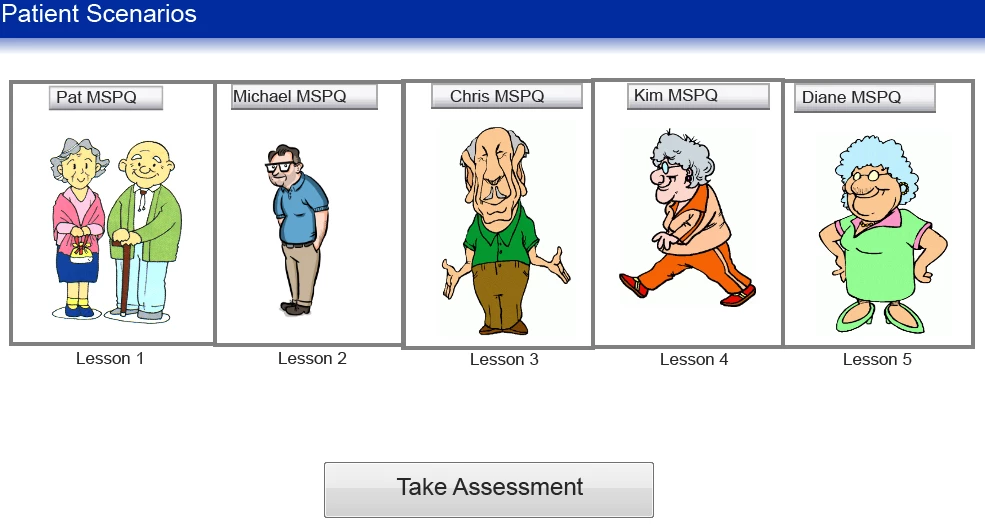
I have been working on the advanced action for sometime and I am lost on how to make this work. can anyone give some advice?

    This topic has been closed for replies.

    1 reply

    Lilybiri
    Legend
    July 19, 2016

    It has been explained multiple times, have some on my blog as well. Will repeat work flow another time, would have been easier if you showed the action you have already at this moment, when clicking each of the images. I suspect it is a standard advanced action, and it will have to be converted to a conditional advanced action with two decisions:

    1. Decision 'Always' is a mimicked standard action with the same command you have at this moment, something like:
         IF 1 is equal to 1
            Assign v_one with 1      this is the tracking variable for that part
            Hide ImageBefore
            Show ImageAfter
    2. Decision 'CheckVars'     

              If v_one is equal to 1 AND
                 v_two is equal to 1 AND
                 ......
             Show Btn_Assess
             Enable Btn_Assess

    Participant
    July 20, 2016

    Thanks so much for replying to my post! I will take a look at your blog also to get more familiar with creating solid actions.

    I used the first decision of If...then, I included a screenshot of how I created the actions. Any feedback on it?

    Lilybiri
    Legend
    July 20, 2016

    I hope that 'Lesson3Impacts' is not a variable, you can use a literal like 1? Can you use the first button in the top control panel (looks like a play button) to view the whole conditional action, including both decisions? At this moment I only see the Then part of the first decision.

    Moreover you forgot the tracking variable. You need to create a user variable for each of the parts, with a default value of 0. When a button is clicked it has to be changed into 1 (Boolean var), which I showed in my description 'Assign v_one with 1'.