
Known Participant
June 10, 2015
Question

Creating custom submit button

  • June 10, 2015
  • 2 replies
  • 1935 views

Hello,

I have been asked to create a quiz with the following features: (I am using Captivate 😎

1. Allow learner to answer the question.

2. Allow learner to skip the question.

3. After each question note if it was answered or not.

I know that with #1 and #2, I can use the submit all function, but I have no way of knowing if the user answered the question.

If I use the submit button rather the the submit all, then the user needs to click on submit, then next button and they want those two buttons combined.

Also, they cannot retake the question as the clear button is disabled once the user clicks submit.

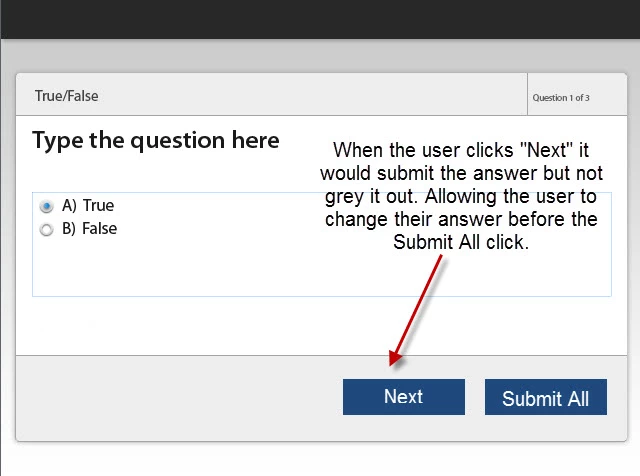
My option is to create a custom submit button (I would call next) that allows the user to submit their question, yet change it if they want. (see image below)
Thanks,

Laura

    This topic has been closed for replies.

    2 replies

    Known Participant
    June 11, 2015

    I am actually looking now to see if I can read SCORM elements via JS after a user clicks Next or Submit. If there's a way to clear the questions via SCORM?

    I didn't realize this simple request would be this difficult.

    Lilybiri
    Legend
    June 10, 2015

    Hello,

    Messing up with question slides is not always a good idea. You have to understand the way they are designed, and skipping a question (using the Next button which is doubling as a Skip button during Quiz) will never allow you to come back to a question slide and give an answer unless you use Submit All. I couldn't make up from your answer if you want the user to be able to come back to a slide or not. The quizzing system variable cpQuizInfoLastSlidePointScored  or cpQuizInfoAnswerChoice could be used to detect the answer. There is no way of combining Skip and Submit button at all, both are embedded objects. Submit button cannot be deleted, Next/Skip button can be unchecked or dragged under another button (Clear).  Retake a question is only possible as long as the user has not clicked on the Next button.

    It would be possible to do this if you are ready to create custom questions, but with the default question slides AFAIK this is not possible. With custom question slides, I mean that you build questions with standard objects, variables, learning interactions and advanced/shared actions. I have several examples on my blog.

    These two blog posts try to explain design of default question slides:

    Question Question Slides in Captivate - Captivate blog

    Question Question Slides - Part 2 - Captivate blog

    Known Participant
    June 10, 2015

    ‌Hello Lilybiri,

    I do not mind creating custom questions, but do these get reported to the L M S as do the standard questioms?

    Laura