Creating multiple choice quiz question from scratch. Need toggle choices and decrement non numeric value!
The title is probably very confusing. I HATE captivate responsive quiz slides. They are really a disaster and very hard to make work. So I created my own.
I have a multiple choice question with 4 choices and I want 3 of them to count as a correct answer.
I created a nice toggle so that the question changes state when clicked and goes back to normal when clicked a second time. I assigned a variable(MC2_Answer) with the letter corresponding to the choice. When the click "A" an A is put in the variable using "increment". Since this question needs 3 of 4 answers chosen I planned on using "contains" in an advanced action to show a correct smartshape. So correct answer is A, B, and D. if the learner chooses these then A, B and D are added to the MC2_Answer variable.
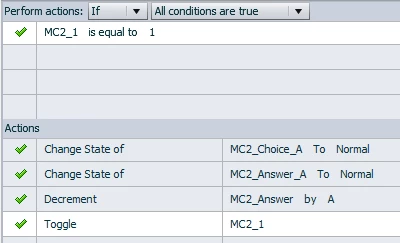

So far it works perfectly. What I can not figure out is that when the learner clicks on "A" a second time to un-choose it, how do I remove the A from the variable. decrement does not work to remove the "A" from the variable.
 AdChoices